
Uptime Monitoring for Startups
You’re shipping daily, talking to users, and counting every dollar of runway. StatusDrift watches your app, API, cron jobs, and SSL certificates every 30 seconds — and gives you a status page on your own domain so you look like a real company from day one.
Free forever tier. No credit card. No sales call. Paste a URL and go.
Why Startups Pick StatusDrift
Early-stage companies don’t need an enterprise observability stack. They need to know their product is up, their customers trust them, and they’re not burning runway on tooling they’ll outgrow in six months.
Actually free to start
The free tier is a real product, not a 14-day trial clock. Enough monitors for an MVP, a status page on your own domain, and the same monitoring engine paid plans use. No credit card, no sales calls, no “free until we decide otherwise.”
Look serious from day one
A public status page at status.yourstartup.com signals maturity to early users, investors, and the reliability-minded engineer you’re trying to hire. It runs on infrastructure independent from your app, so it’s there when you most need it.
Scales without forcing an upgrade
Same workspace, same monitors, more capacity when you need it. Upgrade the day you want 30-second checks, more headroom, or SAML SSO — not before. No per-seat fees, so inviting a new hire or a contractor doesn’t cost you anything.
Know Before Your First 100 Users Do
Early users are brutal. One bad outage right as somebody’s evaluating you can lose the account. StatusDrift runs checks every 30 seconds from multiple regions so you catch it first — and lets you tune how sensitive the alerting is per monitor.
30-second, multi-region checks
Paid monitors run every 30 seconds from checkpoints around the world. You hear about a real outage within a minute — not when a user tweets that your app is broken.
Alerting you control
Per monitor, choose a notification delay (immediate up to 1 hour), a consecutive checks down threshold, and a locations down threshold. Page instantly on the sign-up flow, wait out a transient blip on the marketing site. Smart alerting docs →
Response-time tracking
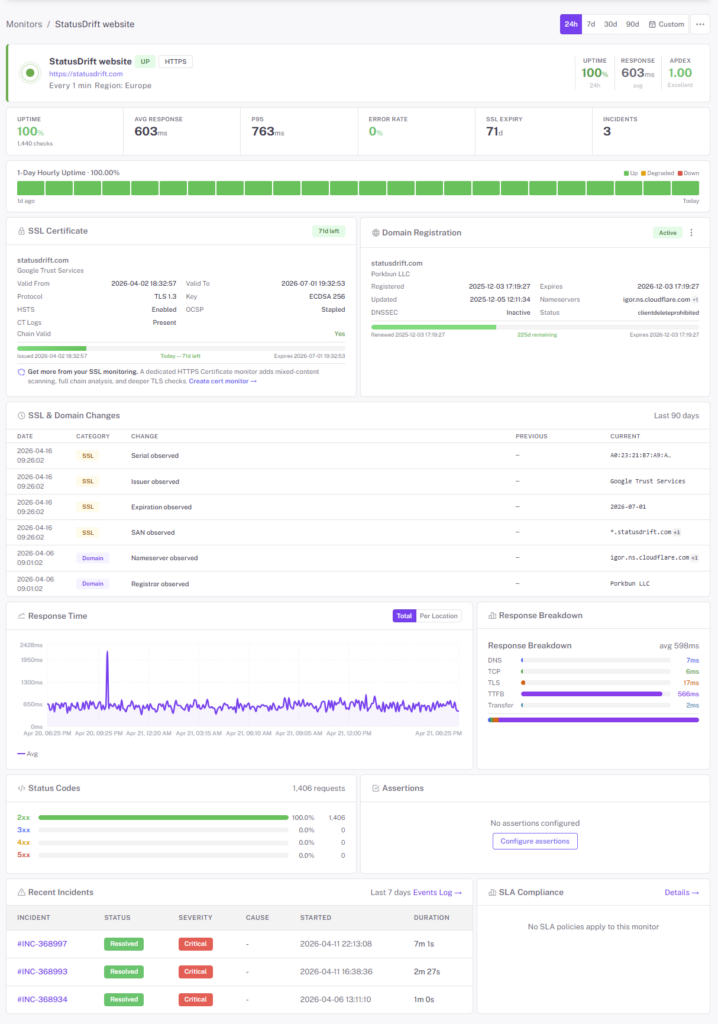
Products rarely fail cleanly — they get slow first. StatusDrift charts response time over time and alerts on latency thresholds, so you spot a degrading service while it’s still fixable instead of during the investor demo.
Monitor Whatever You’re Shipping
Most startup stacks are duct tape on purpose — a landing page, an app, an API, a cron for the nightly export, maybe a webhook listener. StatusDrift watches all of it from one workspace. No agent to install, no second vendor to onboard when you add a service.
- Web app & public pages — HTTP/HTTPS checks with GET, POST, PUT, PATCH, DELETE, custom headers and request bodies
- API endpoints — monitor real behavior, not just 200. Assert on response body, JSON fields (JSONPath), or a JSON Schema
- Authenticated routes — Basic, Bearer token, OAuth, API key, custom header auth for endpoints behind login
- Cron & background jobs — give scheduled jobs a URL to ping. If the ping doesn’t arrive, we alert you. Perfect for nightly syncs, digest emails, and workers
- SSL certificates — expiry alerts 30, 14, 7, 3, and 1 day out, plus chain validation. Never scramble for an expired cert during a launch week
- Domain expiration — the cheapest outage to prevent: don’t lose the domain the day before a Show HN
- DNS records — monitor A, AAAA, CNAME, MX, and TXT records. Flag propagation issues or records changing when they shouldn’t
- TCP / port checks — databases, queues, cache servers — anything listening on a port
A Status Page That Signals You’re Legit
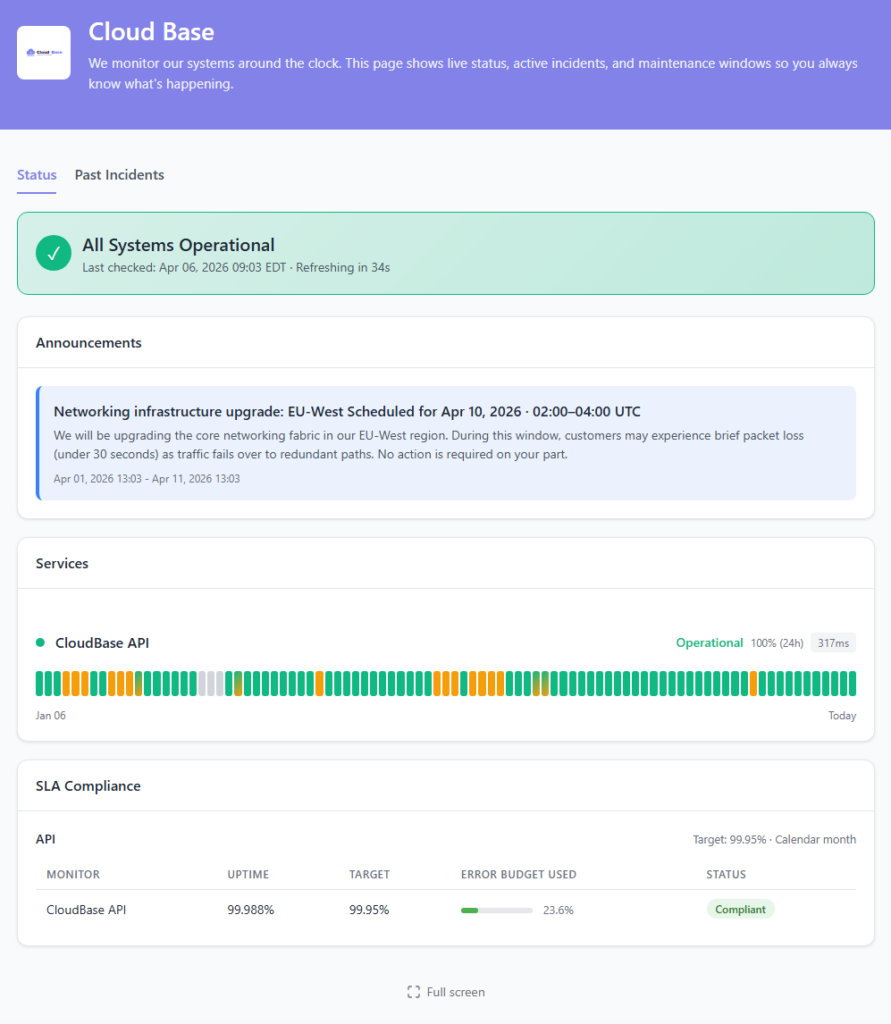
A status page at status.yourstartup.com does more than report downtime. It tells prospective users, hires, and investors that you take reliability seriously enough to publish it. And it’s hosted separately from your main stack, so when production goes dark, the page everyone checks stays up.
- Custom domain & branding — your logo, your colors, your domain. Looks like part of your product because it is
- Components tied to monitors — “App,” “API,” “Marketing site” — each component auto-updates based on the monitors behind it
- Scheduled maintenance — announce planned windows in advance, post updates during, resolve when done
- Public incident timeline — every state change, timestamped, so users can see you’re on it without asking
- 90-day uptime history — the receipts for the reliability claims on your pitch deck
- API-driven incidents — open, update, and resolve incidents programmatically from CI/CD or your own tooling
Alerts Where You Already Work
Send downtime alerts to the channels you actually check. Route different monitors to different destinations, silence noisy services during deploys, and skip the enterprise on-call contract you don’t need yet.

Slack

Discord


Webhook

Microsoft Teams

PagerDuty

Opsgenie

Mobile Push
Also supported: Telegram, Google Chat, Mattermost, ServiceNow, Pushover, Pushbullet, Zapier, IFTTT, n8n, and generic webhooks for anything else.
Grow the Team Without Paying Per Seat
Starting at two and hiring? StatusDrift doesn’t charge per teammate. Invite your whole team on any paid plan — the on-call engineer, the founder who glances at the dashboard, the contractor who needs read-only for a week — all at no extra cost. Team roles docs →
Organization roles
Admin runs the account and billing. Global Editor manages monitors and status pages. Global Viewer gets read-only access. Global Communication can post incidents and updates without editing monitors — ideal for a non-technical co-founder or support teammate.
Group-scoped access
Keep staging separate from production, or isolate a side project from the main product. Put monitors in groups and invite Members to only the groups they need. A contractor working on staging doesn’t need visibility into production.
SAML single sign-on
Once you’ve standardized on Google Workspace, Microsoft Entra ID, Okta, or any SAML 2.0 provider, connect it and let the IdP decide who has access. Deactivating someone there revokes their StatusDrift access in the same step.
What You Actually Get on the Free Plan
No credit card, no trial clock, no “free until we decide otherwise.” The free plan is a real product — enough to monitor an MVP and run a status page on your own domain.
- Up to 5 monitors
- 5-minute check interval
- HTTP, keyword, ping, port, cron/heartbeat checks
- SSL certificate expiry monitoring
- Multi-region checks & configurable alert thresholds
- Email, Slack & webhook alerts
- One public status page
- 90-day data retention
- Full REST API access
- No credit card, no time limit
Pricing That Makes Sense
Start free. Upgrade the day you need 30-second checks, custom-domain status pages, or SAML SSO — not before. Published dollar pricing, no per-seat math.
Free
For pre-launch and early-stage startups. 5 monitors, 5-minute checks, email + Slack + webhook alerts, one public status page, 90-day data retention. No credit card, no time limit.
Pro
For post-launch startups ready to scale monitoring. 30-second checks, multi-step API workflows, JSON assertions, status pages on custom domains, and mobile push alerts.
Business
For startups that have grown into teams. On-call rotations, team API tokens, role-based access, SAML SSO, PagerDuty & Opsgenie routing, and multiple status pages with full branding.
Questions Founders Usually Ask
Do I need a credit card for the free tier?
No. Sign up with an email, paste a URL, and you’re monitoring. The free plan isn’t a trial — you can stay on it indefinitely.
How fast will I know something’s down?
On paid plans, checks run every 30 seconds from multiple regions. You choose how aggressive the alerting is per monitor: immediate notification, a delay up to an hour, a minimum number of consecutive failures, or a minimum number of locations reporting down. Page instantly on your sign-up flow, wait out a flaky third-party on a background job.
Does the status page stay up when my app goes down?
Yes — status pages are hosted on infrastructure independent from your application. When your production goes dark, the page everyone checks stays online.
Will I outgrow the free tier quickly?
Depends on your stack. Free covers 5 monitors, which is enough for a landing page, an app, an API, a cron heartbeat, and an SSL certificate. If you need more, upgrade when you actually hit the limit — not preemptively.
Can I monitor private or internal endpoints?
Public endpoints work out of the box. For internal services, whitelist our check IPs at your firewall — a full IP list is in the docs. No agent to install, no VPN to configure.
Can I manage monitors as code?
Yes. Every dashboard action has a REST endpoint, and we publish a Terraform provider. Keep monitors in version control next to the infrastructure they watch, diff them in pull requests, apply them in CI.
Start Monitoring For Free
Free forever tier. No credit card. No sales call. Paste a URL and get an alert the next time something breaks.