
Ping Monitoring
ICMP Ping Monitoring
Reachability checks for hosts and network devices that don’t run a web server. Measure latency from multiple regions, catch packet-loss trends early, and page the network team when routing falls over — before the application alerts start firing.
Free forever tier. No credit card.
Reachability for Everything Without an HTTP Endpoint
Not every host runs a web server. Network appliances, VPN concentrators, jump hosts, printers, switches, NAS devices, edge gateways — you need to know when they stop responding to the network, and ICMP ping is the lightest-weight way to find out.
- ICMP echo checks from multiple regions — IPv4 and IPv6 hosts, by hostname or IP
- Round-trip latency recorded on every check, per region
- Latency threshold alerts — page when RTT crosses your limit, not just when the host stops replying
- Multi-region verification so a bad transit route for one region doesn’t page the whole team
- Historical latency graphs — spot creeping network degradation before an incident
- No agent on the target — the host just needs to answer ICMP
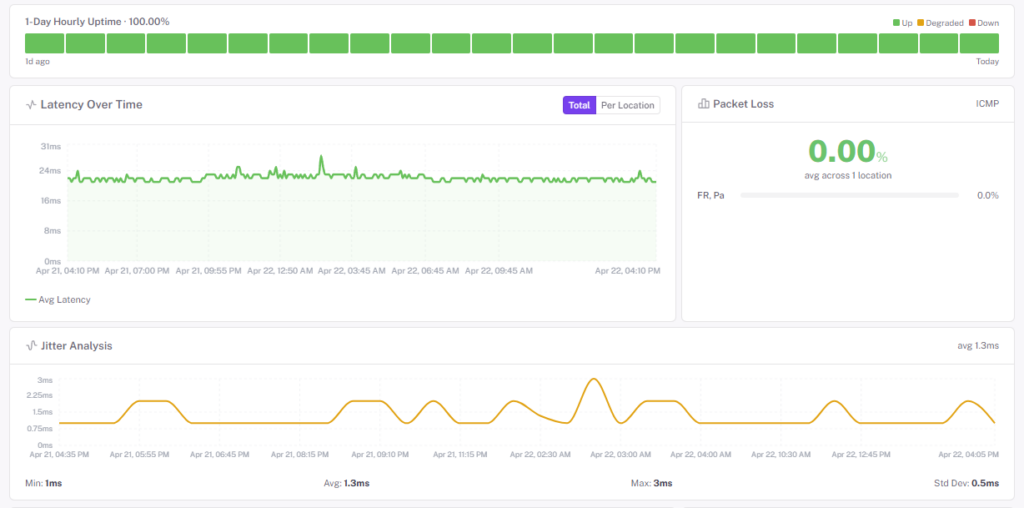
What Ping Catches That HTTP Checks Miss
HTTP monitors answer “is the app responding?” Ping monitors answer “can we even reach the box?” The two fail for different reasons — and when they disagree, the diagnosis is half done.
Latency, not just up/down
A host answering at 4ms is healthy. The same host answering at 800ms is an incident waiting to happen. Historical per-region latency makes creeping network problems visible before users start complaining.
Partial regional failures
Transit peering disputes and BGP route flaps often affect one continent while leaving others untouched. Multi-region ping makes a “some users can’t reach us” problem visible — and names the regions.
Infrastructure without web stacks
Firewalls, routers, load balancers, mail relays, database replicas, monitoring collectors — the things that aren’t pages, but everything else depends on. Ping confirms they’re alive without asking them to serve HTTP.
Tune the Alert to the Host
Not every ICMP timeout is worth waking someone up for. The same per-monitor tuning that runs on HTTP checks applies here — set it service by service.
- Consecutive checks down — fail only after N checks in a row timeout, so a single dropped packet doesn’t page anyone
- Locations down threshold — require N regions to see the failure before alerting, so one transit issue doesn’t look like a full outage
- Notification delay — add a short delay before the first page fires, to let transient flaps self-correct
- Latency thresholds — alert when round-trip time exceeds a ceiling, even if the host is still responding
- Maintenance windows — silence alerts during a planned network change without editing the monitor
Good candidates for a ping monitor
- VPN gateways and bastion hosts
- Network appliances — firewalls, routers, switches
- SMTP relays and mail gateways
- Database servers on private ports (pair with a port monitor for specificity)
- Internal DNS resolvers
- Remote office gateways and site-to-site tunnel endpoints
- Edge devices that shouldn’t fall off the network quietly
Questions Teams Usually Ask
What if my host blocks ICMP?
Some environments block ICMP at the firewall for security reasons. If that’s you, use a port monitor against a TCP port the host is known to answer on — it serves the same “is this box reachable?” purpose and most firewalls allow it.
Can I ping an internal-only host?
Two options: if the host can be reached from the public internet (narrowly allowlisted to our check IPs), the external probes work directly. For fully air-gapped or RFC1918-only hosts, install the StatusDrift agent inside your network — it runs the ICMP check locally and reports results back over an outbound connection, so nothing new has to be exposed.
IPv6 support?
Yes. Monitors target the A or AAAA record — or a literal v4/v6 address — and run ICMP checks wherever the probing region has v6 connectivity.
Ping or port — which do I use?
Ping tells you the host is reachable on the network. A port monitor tells you a specific service is accepting connections. Use ping for infrastructure reachability, use port for application-level liveness (Postgres on 5432, Redis on 6379, SMTP on 25).
How often does a ping monitor run?
Paid monitors run every 30 seconds from multiple regions; free monitors every 5 minutes. The cadence is per-monitor — run the hot-path edge router at 30 seconds and the rarely-used backup appliance at 5 minutes under the same plan.
Can I define ping monitors in Terraform?
Yes — the StatusDrift Terraform provider covers every monitor type. Keep network monitors in the same repo as the infrastructure they watch.
Pairs Well With
Port Monitoring
For when “the box answers” isn’t enough and you need “the service is accepting connections” — TCP/UDP checks on specific ports.
DNS Monitoring
Know when an A or AAAA record changes or stops resolving — often the first sign a reachability problem is about to get worse.
Website Monitoring
For hosts that do run HTTP — full request/response checks with status, keyword, and response time assertions.
Watch the Network Layer Too
Add ping monitors to the hosts your HTTP checks depend on. Free forever tier, no credit card.