On-Call Scheduling
Calendar-Based On-Call With Multi-Step Escalation
Define who carries the pager this week, set an escalation path for unacknowledged alerts, cover a holiday with an override, and attach the schedule to any monitor. When a critical check fails, StatusDrift pages the person on call right now — not the whole team, not the person who left last quarter.
No credit card required.
Three Pieces: Schedules, Policies, Monitors
On-call in StatusDrift is built from three connected pieces: schedules define who’s responsible at any given time, policies define the escalation steps, and monitors point at the policy they want paged. Each piece is simple on its own; together they give you the same fan-out and escalation behavior you’d build in a dedicated on-call product, without the second vendor. On-call docs →
- Schedules — timezone, rotation frequency, interval, start time, and participant list. Org-wide (“global”) or scoped to a specific monitor group
- Policies — multi-step escalation paths. First step usually targets a schedule; later steps can hand off to another schedule or a named responder if nobody acknowledges within the delay you set
- Monitor attachment — enable Page on-call policy on any monitor and pick the default organization policy or a group-specific one. Mix with direct channels on less-critical monitors that don’t need a rotation
- Overrides — temporary coverage changes for holidays, swaps, or PTO without touching the underlying rotation. Override docs →
Rotations That Match How Your Team Actually Works
Timezone-aware
Every schedule has a timezone, so handoffs happen at the same local time for each participant — 09:00 in their own zone, not a UTC offset you have to do math on at the start of every week.
Configurable frequency & interval
Weekly, daily, or a custom interval that matches your team’s convention — shift length and handoff day/time are yours to pick. Short rotations for small teams, longer ones for teams that prefer fewer handoffs.
Follow-the-sun ready
Multiple regional schedules, each in their local timezone, chained into one escalation policy — so coverage follows the workday across continents without anyone carrying an overnight pager they shouldn’t have to.
Overrides without drama
Covering a colleague’s vacation, or one person taking the pager on Thanksgiving so the rest of the team can eat? Apply an override for a window and the underlying rotation continues unchanged afterwards.
Org-wide or group-scoped
A single global schedule for the whole company, or distinct schedules per monitor group — so the payments team’s rotation doesn’t answer for the marketing site’s issues.
Multiple schedules, layered
Business-hours schedule for day coverage, separate after-hours schedule for nights and weekends — layered in a single policy so the escalation finds whoever is actually responsible right now.
Escalation That Keeps Pressing
The first person paged might be offline. The second might be on a flight. A good escalation policy keeps trying. StatusDrift policies are ordered steps, each with its own target (a schedule or a specific responder) and a delay before the next step fires. If nobody acknowledges, the page keeps climbing the chain until someone does.
- Multi-step policies — as many steps as you need, each with its own target and delay
- Delay minutes between steps — how long to wait for acknowledgement before escalating. Short for critical services, longer for ones where one missed page isn’t a crisis
- Target a schedule or a responder — step 1 goes to the primary rotation, step 2 to the secondary rotation or an engineering manager, step 3 directly to a named responder
- Acknowledgement stops the climb — when a responder acks the incident, escalation halts. No redundant paging once someone’s on it
Example escalation flow
- 00:00 — Monitor fires. Policy step 1 pages the Primary On-Call schedule. Whoever’s on rotation gets the ping.
- +05 min — No acknowledgement. Step 2 pages the Secondary On-Call schedule (a separate rotation).
- +10 min — Still no ack. Step 3 pages the engineering manager directly.
- Any step — Responder acknowledges. Escalation stops; incident is being handled.
Coverage You Can Actually See
Two views that answer the two questions on-call teams actually ask.
Current view — “Who’s on now?”
Shows the active responder at each step of every policy. Useful for “if something blew up right this second, who would get paged?” and for spotting a rotation that’s unexpectedly empty.
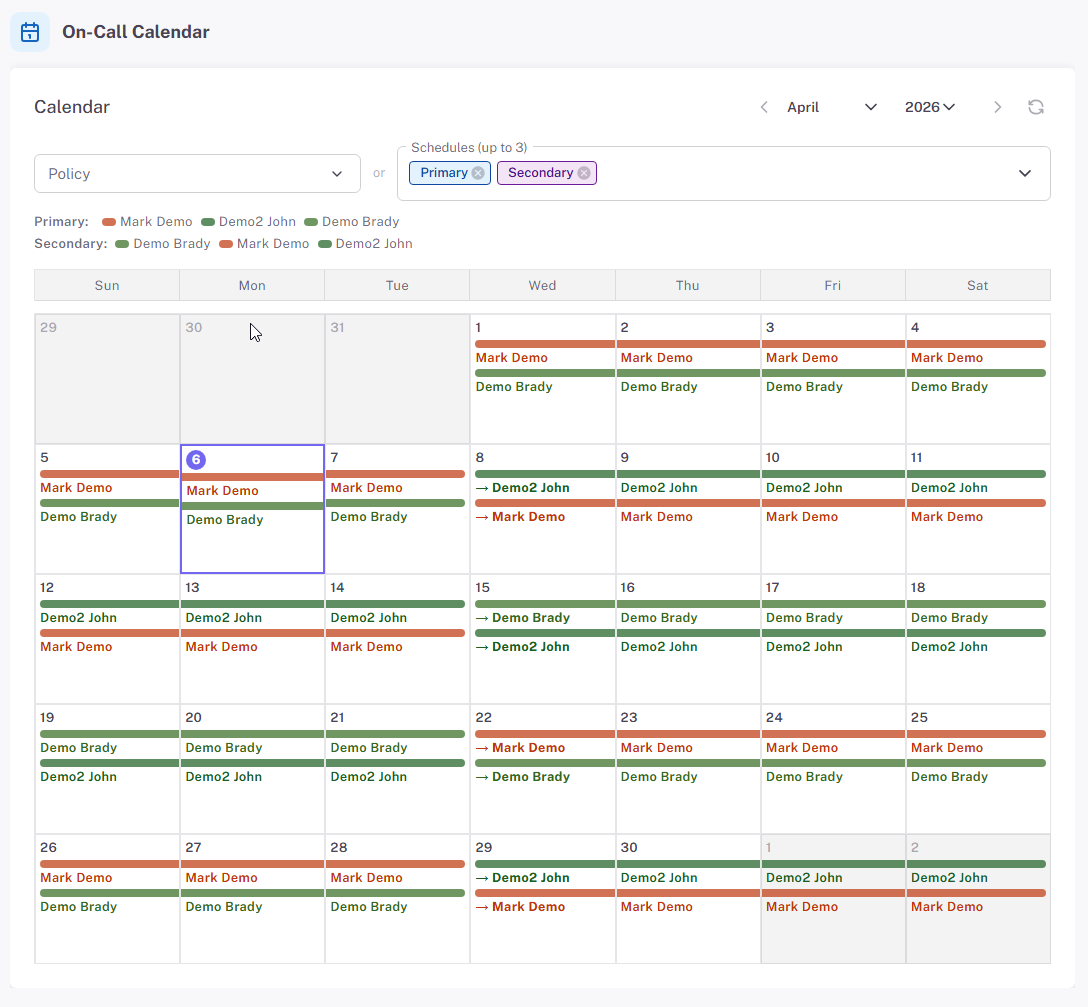
Calendar view — “What about next week?”
Future coverage by day, by shift, by person. Review handoffs across the month, plan overrides for known travel, or visually inspect a single schedule to catch gaps before they page someone at 3am.
Questions Teams Usually Ask
Already on PagerDuty or Opsgenie — should I switch?
Not necessarily. StatusDrift routes natively to PagerDuty and Opsgenie, so you can keep your existing on-call rotations there and just hand the incident off. Use StatusDrift’s built-in on-call for teams that don’t already live in a paging product, or mix — some monitors route to PagerDuty, others use the built-in schedule.
Can one schedule cover multiple monitors?
Yes. Point as many monitors as you want at the same on-call policy. The policy is shared; the monitors all hand off to whoever’s currently on rotation when they fire.
What channels does the page come through?
Whatever the responder has set up for themselves — mobile push, email, Slack DM, a personal webhook. The policy page reaches the active on-call, and they receive it through their configured channels.
Can I do follow-the-sun coverage?
Yes. Build one schedule per region, each in its local timezone, and chain them in a policy so coverage passes from one region’s working hours to the next. Overrides handle holidays and edge cases without rewriting the base schedules.
What if nobody acknowledges at all?
The escalation walks to its last step and stops there. That’s usually an engineering lead or an exec — someone who will be awake and will find someone else to fix it. If you never want an alert to reach that far, design the earlier steps so at least one has a real chance of catching the page.
Can I define schedules and policies in Terraform?
Yes — the StatusDrift Terraform provider covers schedules, policies, monitors, and alert contacts. Review on-call changes in pull requests alongside the services they protect.
Pairs Well With
Alerting
The other routing model — static channel lists attached directly to monitors for services that don’t need a rotation.
Incident Management
Every page opens an incident. The timeline records who acked, at what step, and how long it took — MTTA and MTTR data you didn’t have to pull from Slack.
Team Management
Roles and group-scoped access so schedule admins manage rotations, responders see only what they own, and SAML SSO handles onboarding.
On-Call That Fits How Your Team Actually Works
Calendar rotations, multi-step escalation, overrides, and follow-the-sun coverage — in the same place as your monitors and status page.