Cron Job Monitoring
Cron & Heartbeat Monitoring
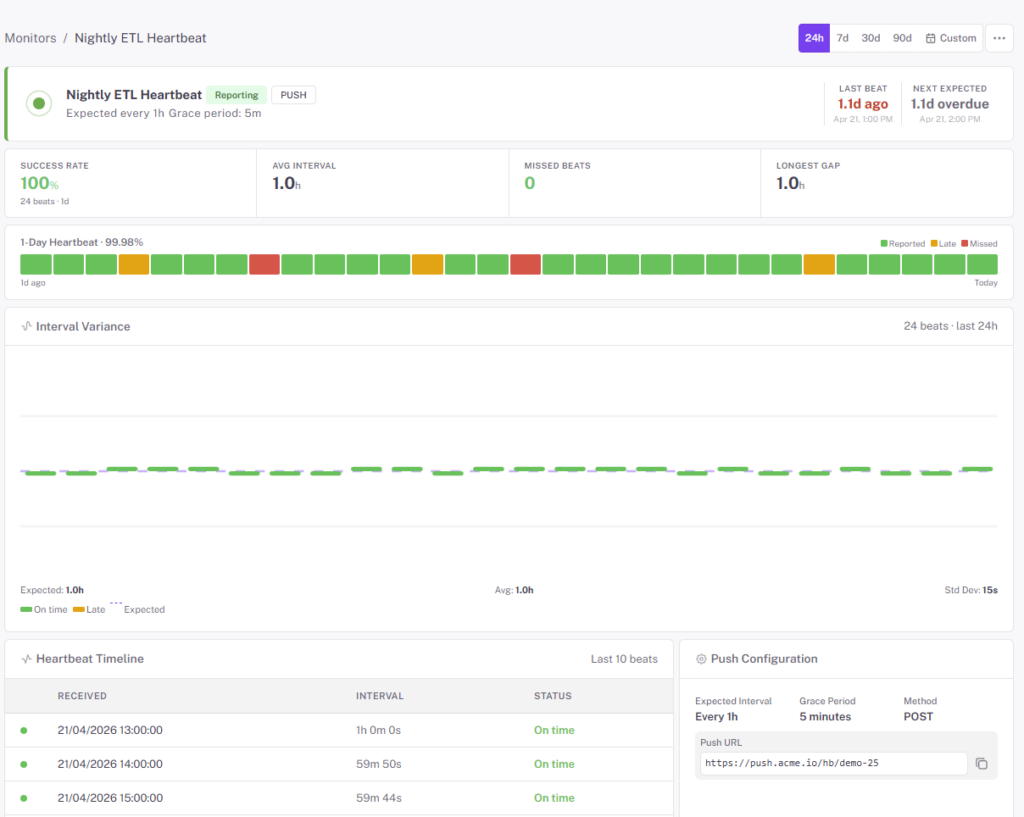
Give every scheduled job a URL to ping when it finishes. No ping in the expected window, StatusDrift pages you. Perfect for backups, ETL runs, log rotation, and the nightly scripts that fail silently until the auditor asks for the report.
Free forever tier. No credit card.
The Jobs That Fail Silently Are the Ones You Care About Most
Backups that didn’t run. Log rotation that ran but filled the disk anyway. An ETL that exited 0 but never processed a row. Nightly reports that stopped emailing three weeks ago. A cron monitor is the inverse of uptime monitoring — it alerts when something doesn’t happen, which is how these jobs break.
- Unique ping URL per monitor — curl it at the end of your job and the monitor resets its “healthy until” clock
- Expected interval — tell the monitor how often it should hear from the job (hourly, daily, every 15 min, or a custom cron expression)
- Grace window — allow for a job that usually runs at 02:00 but sometimes slips to 02:12 without paging anyone
- Late pings fire alerts — if no check-in arrives inside the window, you get paged on whatever channel the monitor uses
- Works from anywhere — any script that can make an HTTP request can report in; no SDK required
- Compose with the other monitor types — pair with HTTP or port monitors for services your jobs depend on
One Line at the End of the Job
Add a curl at the end of your script, or wrap the job with a start/finish ping. No agent, no library, no special permissions.
Bash / shell
#!/usr/bin/env bash
set -euo pipefail

./run-nightly-backup.sh

curl -fsS -m 10 --retry 3
  https://ping.statusdrift.com/<your-monitor-id>
If the backup exits non-zero, the curl never runs, the ping never arrives, and the monitor pages you.
Crontab line
0 2 * * * /usr/local/bin/nightly-etl.sh
  && curl -fsS -m 10
    https://ping.statusdrift.com/<your-monitor-id>
The && only pings on success. If the ETL exits non-zero, no ping arrives and the monitor alerts.
Any language, any runner
Python’s requests, Node’s fetch, a wget in a systemd timer, a GitHub Actions step, a Kubernetes CronJob’s final container command — anything that makes an HTTP request can check in.
Good Candidates for a Heartbeat Monitor
Backups & snapshots
Database dumps, file-system snapshots, offsite replication. Know the backup ran and finished, not just that the script exists.
ETL & data pipelines
Nightly sync jobs, report generation, warehouse loads. Detect the silent failure where the job exits 0 but no rows were processed.
Maintenance & cleanup
Log rotation, cache pruning, cert renewal scripts, billing reconciliation. The boring jobs nobody notices until they stop.
Queue workers & consumers
A worker that should drain a queue every minute. Have it ping the monitor each loop — no ping, it’s hung.
CI/CD deploys & releases
A daily deploy pipeline that should promote nightly builds. Know when the promotion stops firing.
IoT & device heartbeats
Field devices that report in every hour. One missing ping tells you something in the field is offline without polling every device yourself.
Questions Teams Usually Ask
What if the job sometimes takes longer than usual?
Set a grace window. A job scheduled hourly with a 15-minute grace won’t page anyone until 1h15 has passed without a ping. Match the grace to your realistic variance, not the worst case — wider grace means slower detection.
Can I signal that the job started, not just finished?
Yes — ping once at start and once at finish. The start ping confirms the job was triggered; the finish ping confirms it completed. Missing start = scheduler problem. Missing finish = the job hung or crashed mid-run.
What if my job succeeds but with errors?
Use the exit code to decide whether to ping. In shell, wrap the job with && so the ping only fires on success. In a script, catch exceptions and only issue the check-in when the work actually succeeded.
Do I need a library?
No. Any HTTP client works. We recommend curl -fsS -m 10 --retry 3 for reliability — fail hard on errors, short timeout, retry a couple of times against transient network blips.
Can I silence alerts during maintenance?
Yes. Schedule a maintenance window from the dashboard or the REST API. Missed pings during the window don’t page anyone — useful when you’re patching the worker host or deliberately disabling a job.
Can I define cron monitors in Terraform?
Yes — the StatusDrift Terraform provider covers cron monitors alongside the other types. Define the monitor and expected interval in the same repo as the job.
Pairs Well With
Port Monitoring
Pair a heartbeat with a port check on the database or queue the job depends on — know whether a missed ping means the job failed or its dependency did.
API Monitoring
For long-running workers, expose a /healthz endpoint that reports queue depth or last-processed time — and point an API monitor at it to catch deeper health issues.
Alerting
Route missed-heartbeat alerts to the team that owns the job — not the whole engineering org — via per-monitor channels and escalation paths.
Stop Finding Out From the Auditor
A curl at the end of the job is all it takes. Free forever tier.