
Uptime Monitoring for Business Owners
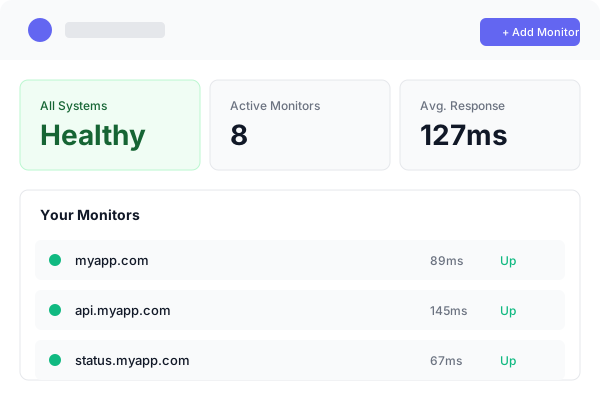
Know your site is down before customers start emailing. StatusDrift watches your website, checkout, login, and SSL certificate from outside your network and tells you the second something breaks — in plain language, in the app you already use, without touching your hosting or calling a developer.
Free forever tier. No credit card. No sales call. Paste a URL and go.
Built for Owners, Not On-Call Engineers
You don’t need a monitoring stack — you need to know your site is working. StatusDrift is the short version: set up a monitor in a minute, get alerted in the apps you already check, and point customers at a status page that makes you look like you’re on top of it.
No developer required
Paste the URL of your website, enter your email, and you’re monitored. No plugin to install, no code to add to your site, no server access needed. If you can send an email, you can set up StatusDrift.
Protect revenue and reputation
A down site costs orders, bookings, and signups — and the customers who bounce rarely come back. Catching an outage in the first minute is usually the difference between a footnote and a bad week on social media.
Show customers you’re on it
When something does break, a public status page at status.yourbusiness.com answers the “is it just me?” question before the first ticket lands in your inbox — and stays online even when your site doesn’t.
What Actually Breaks a Business Website
“The site is down” rarely means the homepage is 404. It usually means the checkout got slow, the SSL certificate expired, the contact form stopped sending, or a plugin update quietly broke something. StatusDrift watches each of those separately, so a problem gets caught where it actually happens.
- Website availability — every page or URL you care about, checked on a schedule from multiple regions
- Checkout, cart, and booking flows — the pages that convert money, watched with the same rigor as the homepage
- Login and customer account areas — monitor pages behind a login with Basic, Bearer, API key, or custom-header auth
- Contact forms and lead capture — confirm the form page loads and responds, not just that the marketing site is up
- SSL certificate expiry — alerts 30, 14, 7, 3, and 1 day out, so you never get the “not secure” warning in a browser
- Domain expiration — the cheapest outage to prevent. Don’t lose the address your customers bookmark
- Mixed-content scanning — HTTPS monitors flag insecure resources loaded on secure pages, before they trigger browser warnings
- Scheduled jobs — give weekly reports, nightly backups, or abandoned-cart emails a URL to ping; if the ping doesn’t arrive, we alert you
- Third-party services — point a monitor at your payment processor, email sender, or booking platform so you find out when they have trouble
Get Alerted Where You Already Are
A monitoring alert that lands in a tool you don’t check is worse than no alert at all. StatusDrift routes downtime to email, the chat apps your team already uses, or a push notification on your phone — each monitor picks its own channels.


Slack

Microsoft Teams

Mobile Push

Discord

Telegram

Webhook

Zapier
Also supported: Google Chat, Mattermost, Pushover, Pushbullet, PagerDuty, Opsgenie, ServiceNow, IFTTT, n8n, and generic webhooks for anything else.
A Status Page Customers Actually Trust
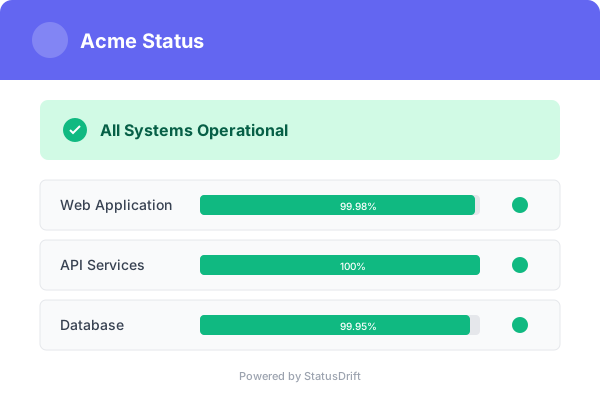
During an outage, customers want to know two things: is it you, and are you on it? A public status page at status.yourbusiness.com answers both — and it runs on separate infrastructure, so it stays online when your site doesn’t.
- Your domain, your branding — logo, colors, and a free HTTPS certificate on your own subdomain. Looks like part of your business because it is
- Components tied to monitors — “Website,” “Checkout,” “Customer Login” — each one auto-updates from the monitors behind it
- Announcements — post a planned-maintenance window, a feature launch, or an “everything is fine” heads-up before anyone has to ask
- Incident timeline — every update, timestamped, public. Customers can see you’re working on it without opening a support ticket
- Publishable postmortems — when an incident is over, write up what happened and publish it from the same page
- Password protection — keep the page internal or share it with specific clients only, if your status page isn’t for the public
- 90-day uptime history — visible receipts for the reliability you claim on your homepage
A Monthly Report You Can Actually Read
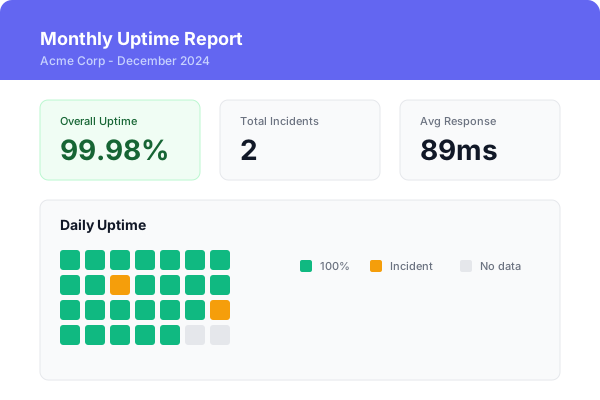
Once a month, an uptime report lands in your inbox: what your numbers look like, when something broke, and how long it was down. The kind of summary you can forward to a partner, a board, or a customer who asked — without asking an engineer to pull it together.
- Overall uptime percentage — per monitor and rolled up, in numbers a non-technical reader understands
- Incident list — when things went down, how long, and how many of your monitors were affected
- Response-time trends — so you can see “the site is getting slower” before customers start complaining
- Optional SLA compliance — set an uptime target (e.g. 99.9%) and a latency target, and the report tells you whether you hit it
Set It Up in Three Steps
You shouldn’t need a weekend and a developer to know whether your website is up. The free tier is live in the time it takes to make a coffee.
1. Paste a URL
Sign up with an email, paste the address of your website, and you’re monitored. No plugin, no server login, no code on your site.
2. Pick where alerts land
Email, Slack, Teams, Discord, a push on your phone, or a webhook into your own system. Whatever you already check during the day.
3. Point customers at a status page
Turn on a public status page on your own domain so the next time something breaks, customers can check it themselves instead of emailing you.
What You Actually Get on the Free Plan
No credit card, no trial clock, no “free until we decide otherwise.” The free plan is a real product — enough to cover a small business site and run a public status page on your own domain.
- Up to 5 monitors
- 5-minute check interval
- HTTP, keyword, ping, port, cron/heartbeat checks
- SSL certificate expiry monitoring
- Multi-region checks & configurable alert thresholds
- Email, Slack & webhook alerts
- One public status page
- 90-day data retention
- Full REST API access
- No credit card, no time limit
Pricing That Scales With You
Start free. Upgrade the day you need faster checks, a custom-domain status page, or mobile push alerts — not before. Published dollar pricing, no per-seat math.
Free
For a single site or a business that’s just getting started. 5 monitors, 5-minute checks, email + Slack + webhook alerts, one public status page, 90-day data retention. No credit card, no time limit.
Pro
For growing businesses. 30-second checks, mobile push alerts, a status page on your own domain with custom branding, and response-body checks on the pages that actually convert.
Business
For businesses run by a team. On-call rotations, team API tokens, role-based access, SAML SSO, PagerDuty & Opsgenie routing, and multiple status pages with full branding.
Questions Business Owners Ask
Do I need technical skills to set this up?
No. The default setup is: paste your website URL, enter your email, done. Everything beyond that — a custom-domain status page, alerts into Slack, JSON checks on a booking flow — is optional and takes a few minutes each when you’re ready.
Does it work with WordPress, Shopify, Squarespace, Wix, or a custom site?
Yes — all of them and any other platform. StatusDrift monitors your site from outside, over standard HTTP, so the platform you built on doesn’t matter. No plugin to install, no app-store review, no agent on your server.
How will I get alerted?
Whichever way you check during the day. Email, Slack, Microsoft Teams, Discord, Telegram, a push notification on your phone, or a webhook into your own system. Each monitor picks its own channels, so the checkout can page you on mobile while the blog just emails.
Is the free plan actually free?
Yes. No credit card, no trial countdown, no automatic conversion. Five monitors, five-minute checks, email + Slack + webhook alerts, one public status page, and 90 days of data — for as long as you want. Upgrade the day you need more, not before.
How fast will I know something’s wrong?
On the free plan, every five minutes. On paid plans, every 30 seconds from multiple regions. You can also tune each monitor to wait for several consecutive failures, or for a minimum number of regions to report down, so a flaky checkpoint doesn’t wake you up at 3 AM.
Can my customers see the status page when my site is down?
Yes. Status pages run on infrastructure separate from your site, so status.yourbusiness.com stays online even when your main site doesn’t — which is exactly when customers need it.
Start Monitoring Your Website in a Minute
Free forever tier. No credit card. No sales call. Paste a URL and get an alert the next time something breaks.