
DNS Monitoring
DNS Record Monitoring
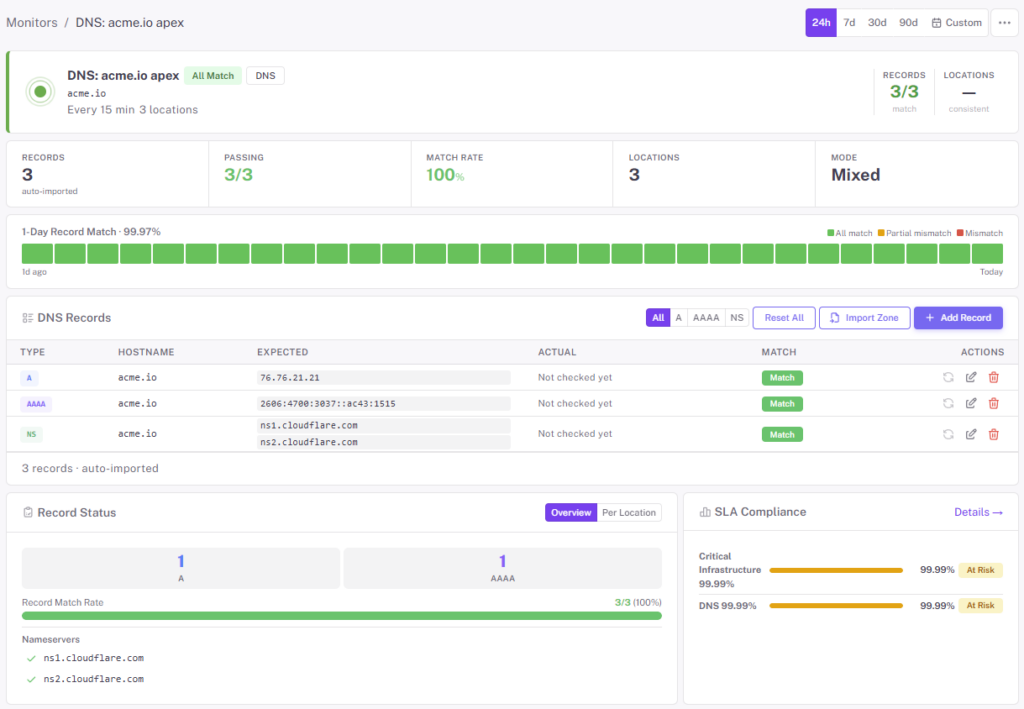
Track A, AAAA, CNAME, MX, TXT, NS, and SOA records from multiple resolvers outside your network. Catch unauthorized changes, silent CNAME drift, and propagation delays — the upstream problems that cause “random” downtime nobody can reproduce.
Free forever tier. No credit card.
DNS Is Where Most “Random” Outages Start
An A record gets edited in the console instead of Terraform. A CNAME points at a CDN tenant that was deleted. An MX record lost its priority. A TXT record for SPF gets truncated. None of these fail cleanly — they just make a fraction of traffic behave weirdly, and the application layer blames itself for hours. StatusDrift watches the records themselves so the upstream change is named and blamed correctly.
- Record types covered — A, AAAA, CNAME, MX, TXT, NS, SOA. Monitor the records that matter for each hostname
- Expected-value assertions — pin a record to its expected value and alert when the answer changes
- Multi-resolver checks — queries run from distributed resolvers outside your network; propagation delays and inconsistent answers both surface
- TTL visibility — see the TTL currently served, useful when you’re planning an imminent record change
- Change history — every observed value recorded with a timestamp, so “when did this CNAME last change” is one dashboard click
- Per-monitor alerting — route DNS change alerts to the network or platform team, not the whole engineering org
What to Pin, and Why
A & AAAA records
Your root and www hostnames. A change here means traffic is landing somewhere new — and if it wasn’t planned, it’s almost certainly an incident.
CNAME records
The mapping from your hostname to a CDN, SaaS tenant, or cloud load balancer. A CNAME pointing at a deleted tenant is a classic “works for most users” bug.
MX records
Where your mail is delivered. An MX change that happened during an admin console session nobody logged — and suddenly important email is bouncing.
TXT records (SPF, DKIM, DMARC)
Your email-authentication config. One truncated SPF record and your transactional mail starts landing in spam. Pin the full value, alert on any change.
NS records
The authoritative nameservers for the domain. A change here almost always means something large is happening — either a migration or an unauthorized transfer. Both are worth paging for.
SOA & serial number
Whenever any record in the zone changes, the SOA serial bumps. Pin it to see every zone edit at a glance — independent of which specific record moved.
Propagation Delay, Made Visible
A DNS change takes effect at your authoritative server instantly — and everywhere else over the next few minutes to a few days, depending on TTLs and resolver cache behavior. StatusDrift queries from multiple public resolvers outside your network, so a change that’s live for half your users and cached for the other half is immediately visible.
- Distributed resolver queries — see the answer multiple resolvers are returning, not just the one closest to you
- TTL you’re actually serving — useful when you want short TTLs before a planned migration
- Change timeline — when the first resolver saw the new value, when the last one caught up
- Per-monitor thresholds — only alert once N resolvers agree on the new value, so a single stale cache doesn’t look like an incident
Need a one-shot check?
The DNS Propagation Checker and DNS Lookup tools give you an instant view across public resolvers — handy when you’re actively making a change and don’t need a persistent monitor yet.
Questions Teams Usually Ask
My DNS provider already has change logs. Why monitor?
Provider change logs show what was edited inside the console. They don’t tell you whether propagation completed, whether resolvers still have an old answer cached, or whether the value you committed is the value being served. External DNS monitoring answers those questions.
Can I monitor DNSSEC?
You can monitor the presence and values of DNSSEC-related records (DS, DNSKEY, RRSIG). Dedicated DNSSEC chain validation is on the roadmap — today the coverage is record-level, not full signature validation.
Does it work for private/internal DNS?
Checks run from the public internet using public resolvers, so records that only exist on internal DNS (split-horizon) aren’t visible. For those, use a health endpoint inside your network that confirms internal DNS resolution works end-to-end.
I’m planning a migration. Will this page me?
Schedule a maintenance window before the change and StatusDrift stays quiet while records move. After the window, update the expected value on the monitor to match the new reality.
How often are records re-queried?
Paid monitors run every 30 seconds; free monitors every 5 minutes. Combined with multi-resolver queries, changes are usually visible within a minute of propagation starting.
Can I define DNS monitors in Terraform?
Yes — the StatusDrift Terraform provider covers DNS monitors alongside every other type. Keep your expected record values in version control next to the zone files they describe.
Pairs Well With
Domain Monitoring
Catch a domain expiry or unexpected registrar transfer before it shows up as a DNS failure.
Website Monitoring
When the site is down and DNS is fine, you’ve narrowed it to the application layer — half the troubleshooting is already done.
SSL Monitoring
A silently-changed A record can land on a server with a cert that doesn’t match your hostname. Run both and catch the mismatch immediately.
Know When DNS Changes — Every Time
Pin your records, watch your zone serial, catch the upstream before the outage. Free forever tier.