Infrastructure Monitoring for DevOps & SRE Teams
Monitor the services, endpoints, and background jobs your apps depend on — from outside your network, on a schedule you control, with alerts that route to whoever’s on call. Define monitors in Terraform, manage them via REST API, and keep your observability in version control next to the infrastructure it watches.
Free forever tier. No credit card. No sales call. Paste a URL and go.
Why DevOps Teams Pick StatusDrift
Your internal dashboards tell you what your servers think is happening. StatusDrift tells you what the internet actually sees — and routes alerts to the right human before your users file tickets.
External, out-of-band verification
Checks run from probes outside your network, on infrastructure separate from the services they watch. If your VPC loses peering, your CDN misroutes, or your cert chain breaks for the outside world only, you find out immediately — not from the customer whose CI job started failing.
Monitors as code, not clickops
Define every monitor, status page, and alert rule in Terraform or through the REST API. Review changes in pull requests, apply them in CI alongside your infrastructure, and stop hunting for the “why is this monitor paging?” answer in an audit log written by someone who left last year.
Alerts per monitor, not per account
Attach one or more alert channels to each monitor — or hand it off to a calendar-based escalation path for anything that needs an on-call rotation. Page Slack for the marketing site, page PagerDuty for the checkout API, page the whole team via email for a production SSL expiry. Silence it all during maintenance windows without touching the monitor itself.
Monitor Your Entire Stack From One Place
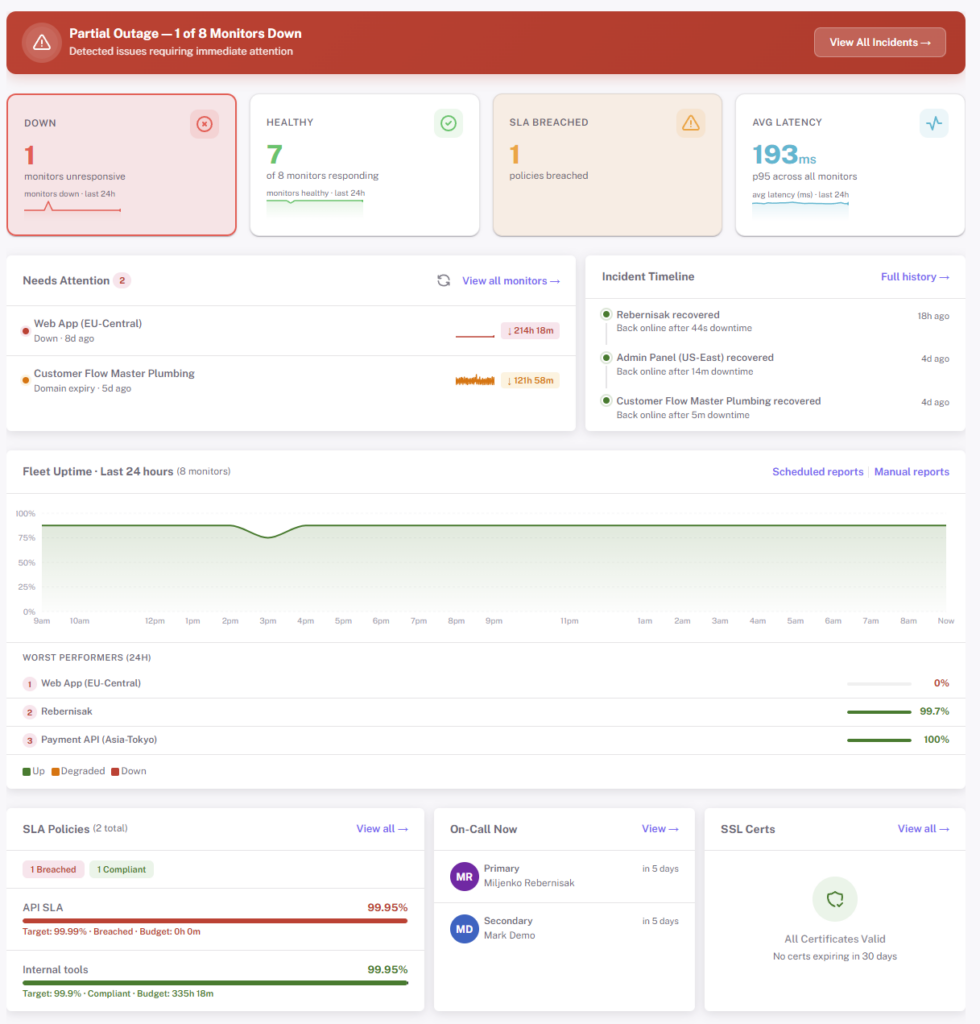
Production isn’t a single URL. It’s an API behind a CDN, a database on a private port, a DNS record that points to the right load balancer, a cert that expires in 47 days, and the cron that rotates logs on the box everyone forgets exists. StatusDrift watches all of it.
- HTTP / HTTPS — web apps, APIs, internal services behind auth. Assert on status codes, response bodies, JSON fields, and headers
- TCP & port checks — databases, caches, message queues, SMTP, anything listening on a port. Know when Postgres, Redis, or a Kafka broker stops answering
- DNS records — A, AAAA, CNAME, MX, and TXT records. Catch propagation delays and unauthorized changes
- SSL certificates — expiry alerts at 30, 14, 7, 3, and 1 day out, plus chain validation. No more Sunday-night renewal fire drills
- Domain expiration — the cheapest outage to prevent is the one where you forgot to renew the domain
- Cron / heartbeat checks — give scheduled jobs a URL to ping when they finish. No ping = page. Perfect for backups, log rotation, nightly syncs, and ETL runs
- Ping / ICMP — network connectivity for servers and devices without an HTTP endpoint
- Keyword & content assertions — catch a 200 that’s secretly a maintenance page or a broken deploy
Alerting You Can Actually Tune
A good alert is one an engineer is glad to get at 3am. A bad alert is the eleventh one they’ve ignored this week. StatusDrift gives you per-monitor controls so the signal-to-noise ratio matches how critical the service actually is.
Fast checks on paid plans
Paid monitors run on a 30-second cadence from multiple regions. Free monitors run every 5 minutes. Pick the frequency that matches how much downtime actually costs you for each service — not a single account-wide setting.
Per-monitor alert thresholds
Set a notification delay (immediate up to 1 hour), a consecutive checks down threshold, and a locations down threshold per monitor. Page instantly on the payments API, wait out a transient blip on the marketing site. Smart alerting docs →
Maintenance windows
Schedule a maintenance window before a deploy or a migration and alerts stay silent for exactly that period. Recurring windows for weekly restarts, one-off windows for a database cutover — no 2am false pages for work you planned.
Incident Response Without the Tool Sprawl
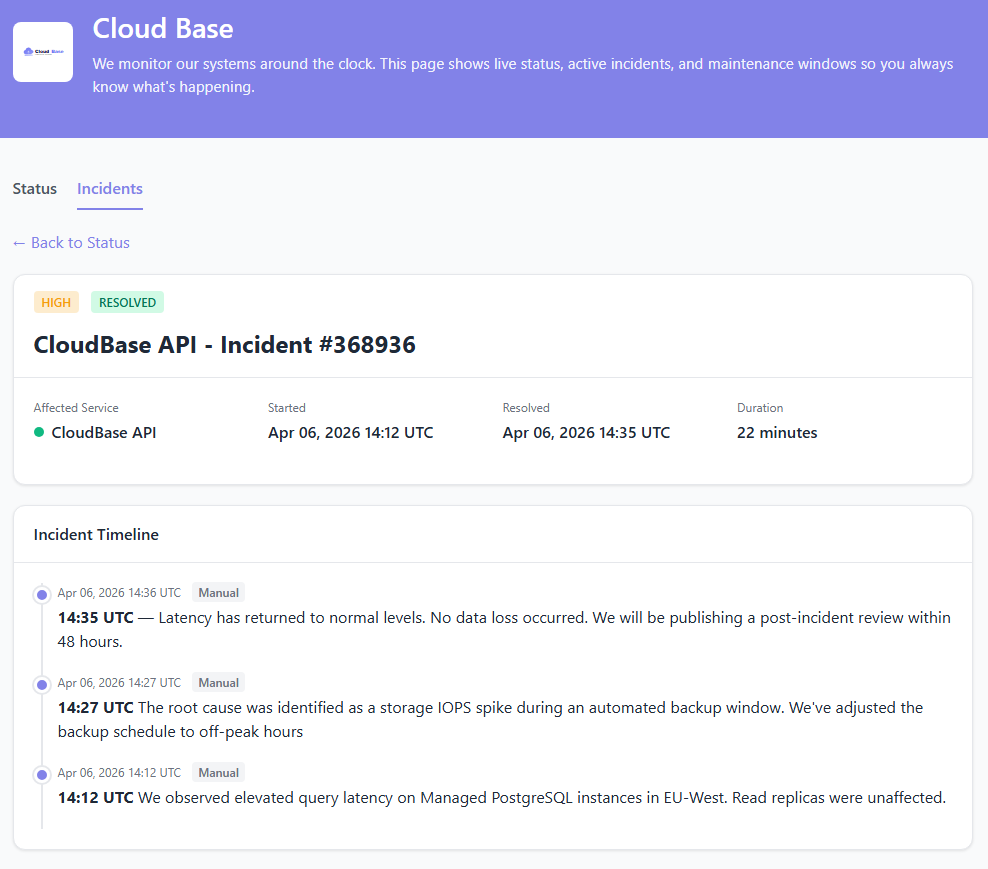
When a check fails, StatusDrift opens an incident, notifies the right people, and gives you a place to coordinate the response — without forcing you to wire up a separate incident-management product for the things your monitor tool already knows about.
- Automatic incident creation from failing checks, with the relevant monitor, failure reason, and regions attached
- Escalation policies and on-call rotations on the Business plan — or route to PagerDuty and Opsgenie if you already have that stack
- Public status page components update automatically based on the monitors behind them
- Post-incident timeline with every state change timestamped — drop it straight into your post-mortem doc
Let’s Get Technical
Everything you do in the dashboard, you can do as code. Keep monitors in version control, diff them in pull requests, and apply them in the same CI pipeline that ships your app.
Terraform provider
Declare monitors, alert contacts, and status pages as resources. When you add a new service to your infrastructure repo, the monitor that watches it ships in the same PR. Decommission a service and its monitor goes with it.
Full REST API
Every dashboard action has a REST endpoint — monitors, alert contacts, maintenance windows, incidents, status pages, and teams. Token auth, predictable resource URLs, JSON in and out. Automate anything you’d otherwise click.
CI/CD hooks
Open and resolve incidents from your deploy pipeline. Schedule maintenance windows before a release. Silence monitors during a canary. Use the GitHub Actions integration or hit the REST API directly — whatever fits the pipeline you already have.
Alerts Where Your Team Already Lives
Attach any combination of channels to each monitor, or send it to a calendar-based escalation path. Page Slack during the day, PagerDuty at 3am, email the whole team when an SSL cert is close to expiry — all configured per monitor, no separate on-call product required.

Slack

PagerDuty

Opsgenie

Microsoft Teams

Discord

Webhook


Mobile Push
Also supported: Telegram, Google Chat, Mattermost, ServiceNow, Splunk On-Call, Pushover, Pushbullet, Zapier, n8n, and generic webhooks for anything we haven’t listed.
Team Roles for Engineers and Operators
DevOps work crosses teams — platform, SRE, backend, security, support. StatusDrift’s roles and group-scoped access keep each person looking at the monitors they care about, without per-seat fees for the people who just need to glance at the dashboard.
Organization roles
Admin manages the account and billing. Global Editor manages monitors and status pages. Global Viewer gets read-only across the workspace. Global Communication can post incidents and updates without editing monitors — ideal for support or a customer-facing engineer running an incident.
Group-scoped access
Separate staging from production, or one product from another. Put monitors in groups and invite Members to only the groups they should see. A contractor on a single environment doesn’t need visibility into every other service you run.
SAML single sign-on
Connect any SAML 2.0 identity provider — Okta, Microsoft Entra ID, Google Workspace, JumpCloud. Deactivate someone in your IdP and their StatusDrift access goes with them. Roles can map from IdP groups so onboarding doesn’t require a second ticket.
What You Actually Get on the Free Plan
No credit card, no trial clock, no “free until we decide otherwise.” The free plan is a real product — enough to cover a homelab, a side project, or the first few critical services of a real stack.
- Up to 5 monitors
- 5-minute check interval
- HTTP, keyword, ping, port, and cron/heartbeat checks
- SSL certificate expiry monitoring
- Multi-region checks & configurable alert thresholds
- Email, Slack & webhook alerts
- One public status page
- 90-day data retention
- Full REST API access
- No credit card, no time limit
Pricing for DevOps Teams
Start free. Upgrade the day you need 30-second checks, Terraform-managed status pages, or on-call rotations — not before. Published dollar pricing. No per-seat math.
Free
For side projects, homelabs, and a team’s first few critical services. 5 monitors, 5-minute checks, email + Slack + webhook alerts, one public status page, 90-day data retention. No credit card, no time limit.
Pro
For small teams running production. 30-second checks, multi-step API workflows, JSON assertions, status pages on custom domains, mobile push alerts, and longer incident retention.
Business
For DevOps and SRE teams on call. On-call rotations, escalation policies, team API tokens, role-based access, SAML SSO, PagerDuty & Opsgenie routing, and multiple status pages.
Questions DevOps Teams Usually Ask
Can I manage monitors in Terraform?
Yes. The StatusDrift provider exposes monitors, alert contacts, maintenance windows, status pages, and teams as Terraform resources. Keep them in the same repo as the infrastructure they watch, diff them in pull requests, and apply them in CI. Terraform docs →
Can I monitor internal services behind a firewall?
Public endpoints work out of the box. For internal services, allowlist our check IPs at your firewall — the full IP list is published in the docs and is stable across regions. No agent to install, no VPN, no outbound tunnel.
How fast will I know something’s down?
Paid monitors run every 30 seconds from multiple regions. Free monitors run every 5 minutes. You control consecutive-failure and locations-down thresholds per monitor, so a flaky service doesn’t page you for the first blip but a confirmed outage does.
Does on-call scheduling come built in?
The Business plan includes on-call rotations and escalation policies. If you already live in PagerDuty or Opsgenie, StatusDrift routes there natively and your existing rotations handle the paging.
Can I silence alerts during deploys?
Yes. Schedule maintenance windows from the dashboard, the REST API, or your deploy pipeline. Alerts stay silent for the window, and the public status page shows scheduled maintenance instead of an incident.
Does the status page stay up when my infra doesn’t?
Yes. Status pages are hosted on infrastructure separate from the monitored services. If your production goes dark, the page your users check stays online — which is the whole point of having one.
Ship With Confidence
Start monitoring your infrastructure in minutes. Free forever tier, no credit card, no sales call.