
Uptime Monitoring for Agencies
Watch every client site from a single dashboard. Send white-label status pages and uptime reports your clients will keep paying for. Find out about downtime before the 9 AM “is my site down?” email.
Free forever tier. No per-client fees. No credit card required.
Why Agencies Pick StatusDrift
You’re managing 10, 50, or 200 client sites. You need one place to see them all, something professional to show the client, and a pricing model that doesn’t punish you for growing.
Built for portfolios
Group monitors by client, project, or retainer tier. Filter, tag, and triage in one view. No more bouncing between five monitoring accounts because a freelancer set them up that way three years ago.
White-label everything
Status pages live on the client’s own domain, in the client’s colors, with the client’s logo — our name nowhere in sight. The client sees a professional status page that looks like it came from you, because it did.
Pricing that scales with sites, not seats
Pay per monitor, not per client and not per teammate. Add a new client? Add their monitors. Hire a new junior? They come in free. No per-seat tax for the person who checks the dashboard once a week.
One Dashboard for Every Client Site
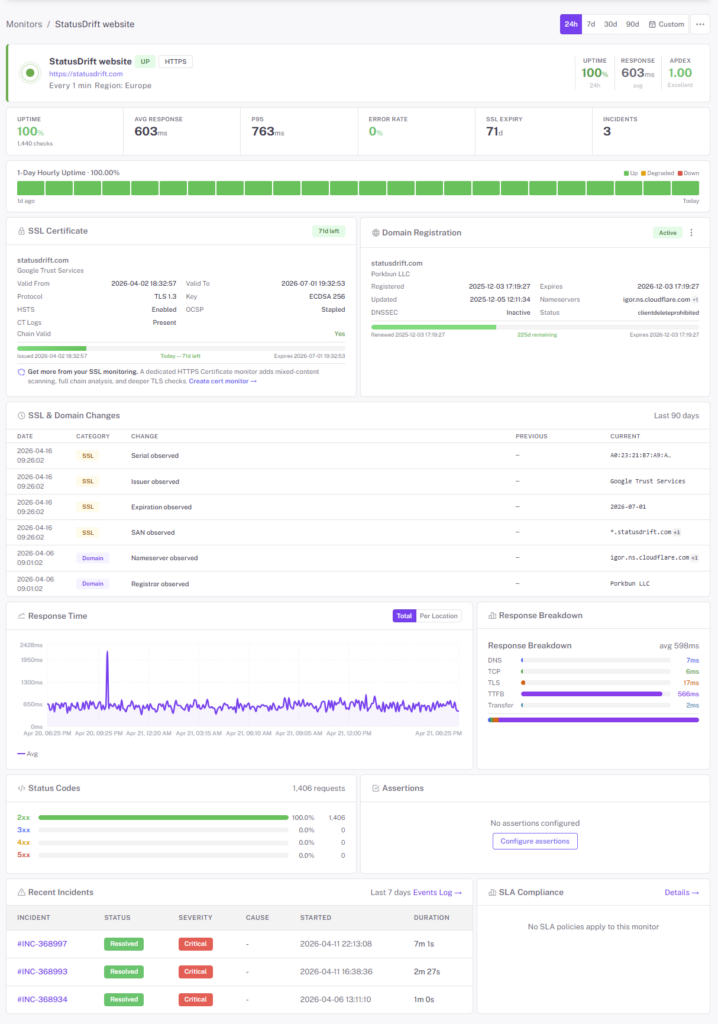
Agency monitoring breaks the same way every time: one freelancer spun up Pingdom, another account got handed over in a messy transition, two of the 40 WordPress sites are on someone’s personal Uptime Robot free tier. StatusDrift replaces all of that with one workspace.
- Client groups & tags — organize monitors by client, retainer tier, platform, or any label you invent
- Global search — jump to any monitor, client, or status page in two keystrokes
- Health-at-a-glance — portfolio-level uptime tiles so you spot the red before the client spots it
- Per-monitor alert rules — different notification delays, thresholds, and recipients for different clients, all configured where you see the monitor
- One workspace, many status pages — manage every client’s public page from the same place you manage their monitors
White-Label Status Pages on Every Client’s Domain
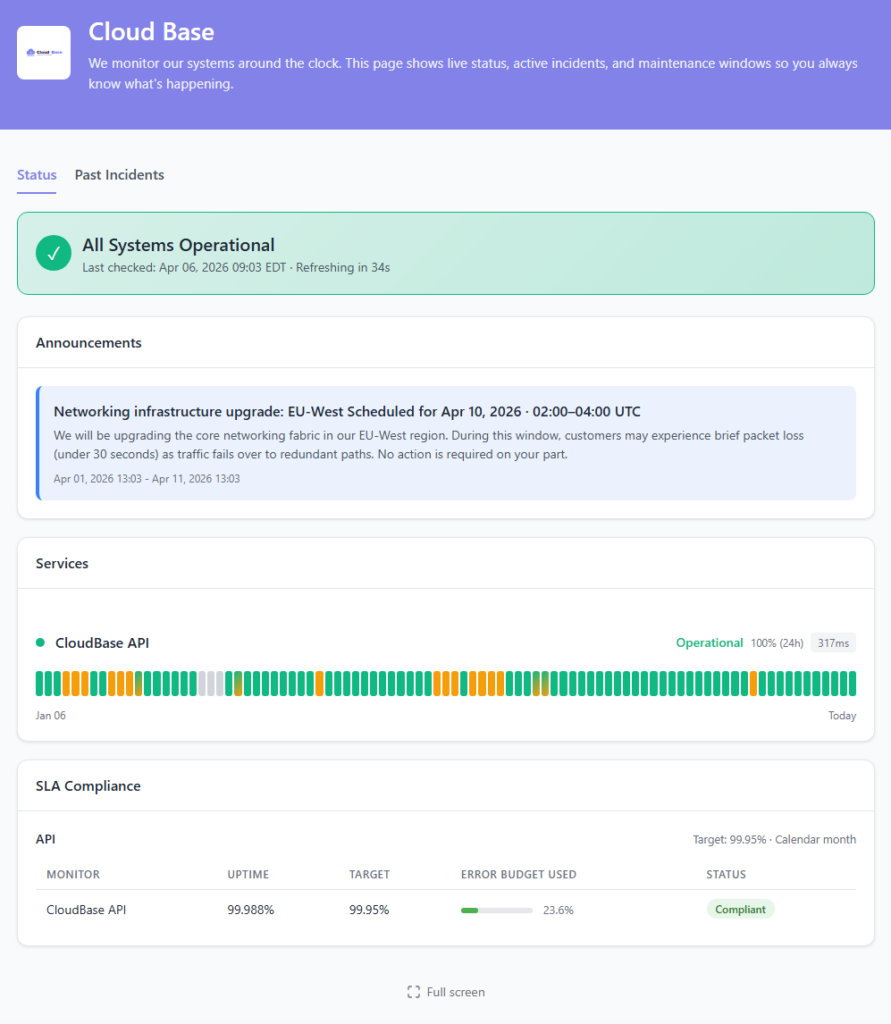
When a client’s site goes down, their users email them — not you. A status page at status.theirdomain.com answers the question before the support ticket gets created, and shows them exactly why they’re paying your retainer.
- Custom domain per client — status.clientA.com, status.clientB.com, each one independent
- Client branding — their logo, their colors, their fonts, their wording
- No StatusDrift branding — “Powered by” badge removable on agency plans, so your client never sees us
- Unlimited status pages — one per client, not one per account
- Scheduled maintenance — announce planned windows, keep everyone calm when things are intentionally down
- Public uptime history — 90 days of receipts for the 99.9% you’re claiming on the invoice
Reports That Justify the Retainer
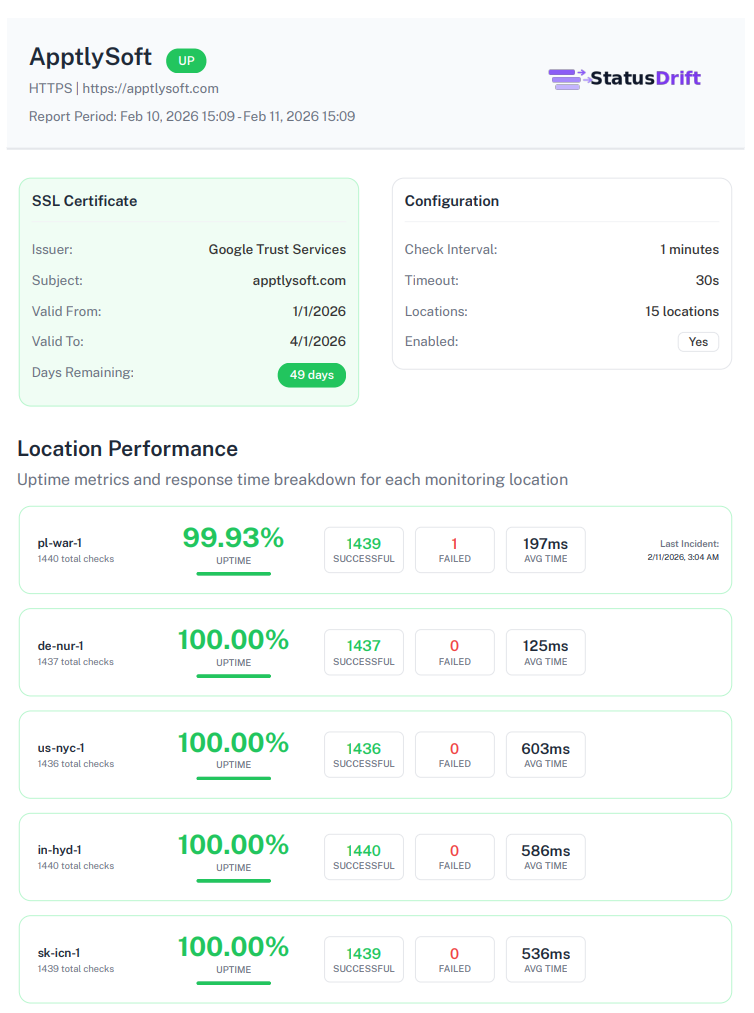
Retainer renewals go smoother when the client has a number in front of them. Monthly uptime reports land in their inbox automatically — branded as your agency, with the work you actually did.
- Monthly uptime summaries — per-client, branded, delivered on a schedule you set
- Incident breakdown — what happened, when it was detected, when it was resolved, what the fix was
- Response-time trends — line charts showing performance over the month, not just “up or down”
- SSL & domain renewals — certificates you quietly renewed before expiry, on the record
- PDF export — for the client who still wants a “real” report attached to the QBR deck
- Automated delivery — reports go out on the 1st without anyone remembering to send them
Catch Issues Without Babysitting a Dashboard
Your team can’t stare at 200 monitors all day. StatusDrift watches them, and — crucially — lets you decide how loud it should get about each one.
30-second checks
Paid monitors run every 30 seconds from multiple global regions. You’ll know about a real outage within a minute of it starting — not 20 minutes later when a client’s ops lead happens to refresh the page.
Alerting you control
Per monitor, choose a notification delay (immediate up to 1 hour), a consecutive checks down threshold, and a locations down threshold. Flagship client gets paged instantly. Legacy WordPress site from 2019 waits for three consecutive failures. Smart alerting docs →
SSL & domain auto-watch
Every client domain gets cert-expiry alerts 30, 14, 7, 3, and 1 day before it breaks. Same for domain registration. You renew quietly, the client never notices, you bill for “proactive monitoring” with a straight face.
Monitor Any Platform Your Clients Run On
A healthy agency portfolio isn’t one stack. It’s WordPress and Shopify and Webflow and a custom Rails app and that one Squarespace site the client refuses to migrate. StatusDrift works on all of them — we just check URLs, so the platform underneath doesn’t matter.

WordPress

Shopify

Webflow

WooCommerce

Magento

BigCommerce

Custom Apps
Anything With a URL
Alerts Where Your Team Already Works
Route different clients to different channels. Route after-hours alerts to the on-call engineer. Route “site returns 500 for 3 minutes” to your Slack, not the client’s. You decide.

Slack

Microsoft Teams

Discord

PagerDuty

Opsgenie


Mobile Push
Webhook
Also supported: Telegram, Google Chat, Mattermost, ServiceNow, Pushover, Pushbullet, Zapier, IFTTT, n8n, and generic webhooks for anything else.
Roles Built for Agency Workflows
Your account manager doesn’t need to edit monitor configs. Your client doesn’t need to see other clients. StatusDrift ships with organization-level roles plus group-scoped membership, so everyone gets exactly the access they should. Team roles docs →
Organization roles for your team
Admin runs the account. Global Editor manages monitors and status pages but can’t touch billing or team settings. Global Viewer gets read-only across the whole workspace. Global Communication can post incidents and updates without editing the underlying monitors — perfect for on-call or comms folks.
Client-scoped group access
Put each client’s monitors in their own group, then invite a Member assigned only to that group. They see uptime, incident history, and response-time data for their sites — and nothing else. Pick View, Editor, or Communication per group to match how involved each client wants to be.
SAML single sign-on
Connect any SAML 2.0 identity provider — Google Workspace, Microsoft Entra ID, Okta, JumpCloud, and the rest. Roles can be assigned automatically from your IdP, so deactivating someone there revokes their StatusDrift access with no extra step.
Pricing That Scales With Your Portfolio
Pay for the monitors and features you actually use. No per-seat fees, no per-client fees, no “enterprise” gotchas at 20 sites.
Free
Try it with one client. 10 monitors, 5-minute checks, one status page, email + Slack + Discord alerts. No credit card, no time limit.
Pro
Small agencies and freelancers. 30-second checks, multiple status pages with custom domains, mobile push alerts, advanced assertions, and longer incident retention.
Business
Built for growing agencies. Full white-label (no “powered by”), unlimited status pages, SAML SSO, organization + group roles, PagerDuty & Opsgenie routing, and automated client reports.
Questions Agencies Usually Ask
Can clients see StatusDrift’s branding?
Not on the Business plan. Status pages, reports, and email notifications go out under your agency’s name, logo, and domain. Clients don’t need to know we exist.
How many status pages can I have?
Business plans include unlimited status pages — one per client, or more if you have internal vs. public pages per client. Each page can have its own custom domain.
Do you charge per client?
No. You pay for monitors. How you assign them to clients is your business. Add a new client with 5 monitors? That’s +5 monitors. Your per-client cost is whatever you decide to bill them.
Do you charge per team member?
No. Invite your whole team on any paid plan. The junior who checks the dashboard once a week costs the same as the on-call lead: nothing.
Can I resell monitoring as part of a retainer?
Yes, and most agencies do. Our pricing is wholesale — you decide your retail markup. Package monitoring inside a “care plan” or bill it as a line item. We don’t care as long as the account stays current.
What if a client wants to take their monitoring with them?
You can export a client’s monitors and status page history. If they set up their own StatusDrift account, we can help migrate. Messy agency break-ups should at least be clean on the technical side.
Monitor Every Client Site From One Place
Start free. Upgrade when you outgrow the free tier — or when a client asks for a white-label status page.