
Status Pages
Status Pages That Stay Up When You Don’t
Public or password-protected, hosted on infrastructure separate from the services they report on. Components update automatically from the monitors behind them, announcements let you communicate during an outage, and postmortems give customers the why after it’s over — all branded as yours.
Free forever tier includes one public status page. No credit card.
A Status Page Worth Pointing Users At
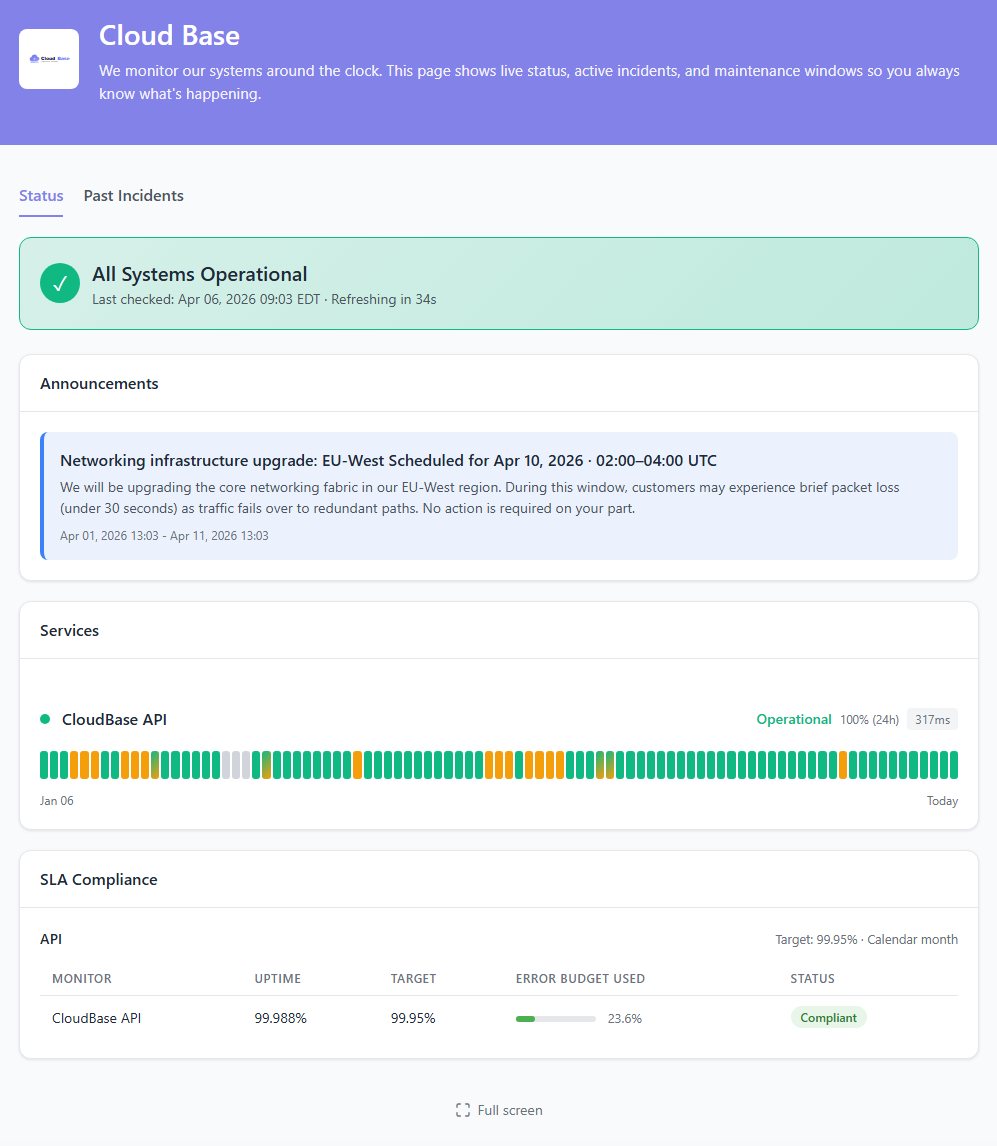
A good status page turns an incident from “the site is broken, no idea why” into “yes, we see it, here’s what we’re doing.” The page itself stays online during the outage — that’s the whole point — and the components on it reflect the same signal your on-call is already acting on, because both are tied to the same monitors.
- Components that update themselves — tie a component to a monitor, a monitor group, or a tag, and its status follows whatever the checks say
- Hosted on separate infrastructure — the status page stays online even when your production is down. That’s the one time your users actually need it
- Custom branding — logo, colors, and typography to match your product, not ours
- Custom domains — serve the page at
status.yourdomain.comwith HTTPS handled for you. Custom domain setup → - Password protection — for internal status pages covering employee tools, staging, or partner-only services. Password-protected page docs →
- Announcements — post a banner for non-incident comms like a planned deploy window, feature rollout, or known third-party issue. Announcement docs →
Five Ways to Organize Components
A status page is a view on top of your monitors. Pick the source type that fits how your team already thinks about services. Content-type docs →
All Monitors
Every monitor in the account on a single page. New monitors show up automatically — good for a high-level “everything we run” view.
Single Monitor
One page, one service. Useful for a focused public page on a single product or the marketing-facing “is the API up” page.
Monitor Group
All monitors in a specific group. Match your existing team/product split — one page per product line, one per environment.
Tag
Every monitor carrying a tag — customer-facing, payments, eu-region. Cross-cuts groups, so a single monitor can surface on multiple pages without duplication.
Custom
Named sections you define, in the order you want them, mixing monitors from any group. Use this when the default shapes don’t match how customers think about your product.
Public or password-protected
Any of the above can be public (customer-facing) or password-protected (employees, partners, staging). Same feature set, different audience.
From “Everything’s Green” to “Here’s the Postmortem”
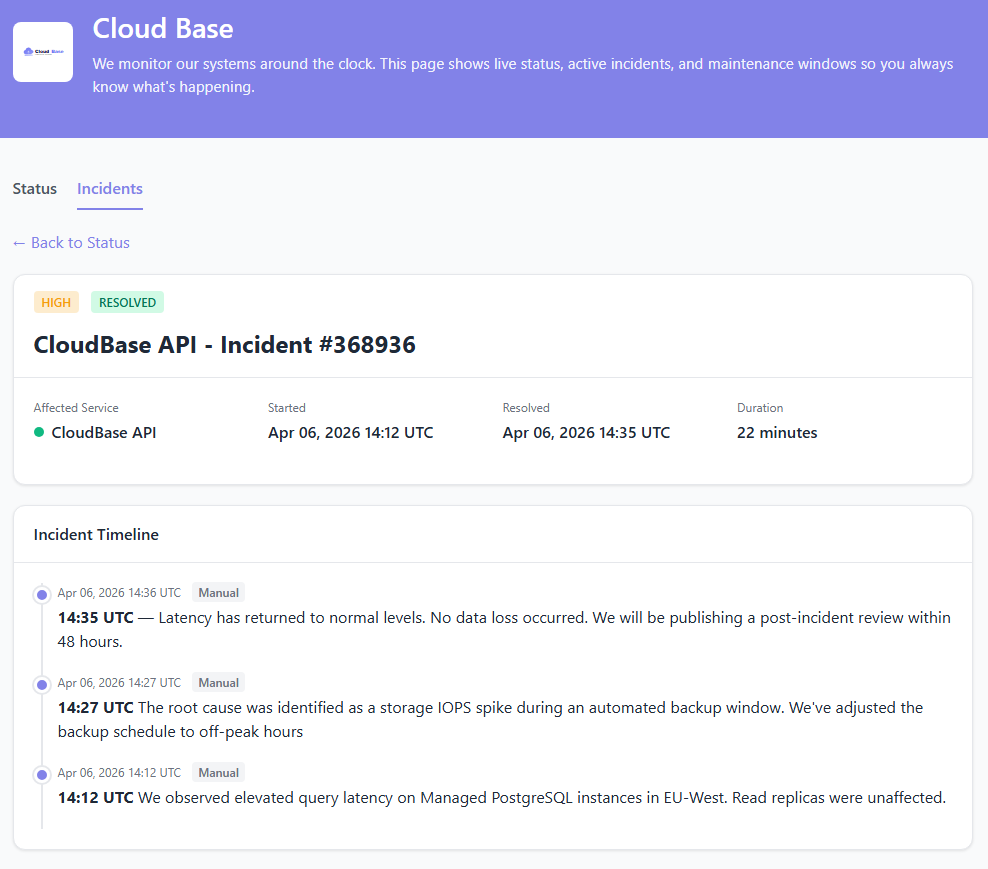
An incident on the status page isn’t a separate thing to maintain — it’s the same incident your on-call is already responding to. When a monitor fails, StatusDrift opens an incident, the component on the page turns red automatically, and your team adds updates as the response unfolds. When it’s resolved, you can publish a postmortem directly on the page so customers don’t have to hunt for the “what happened” post on your blog.
- Auto-updated component status based on the monitors behind it — the page reflects reality without manual steps
- Manual updates & investigation notes to give customers more than just a red dot — “we’ve identified the cause”, “fix rolling out”, “monitoring recovery”
- Scheduled maintenance announced ahead of time and displayed on the page, with alerts silenced automatically during the window
- Published postmortems — write up what happened, why, and what changed, and attach it to the incident so the record lives with the outage itself
- Announcements for non-incident comms — upcoming launches, deprecations, scheduled windows, known third-party issues that don’t warrant opening an incident
Public, Internal, or Both
Status pages aren’t just a customer-facing tool. Internal pages for employees, partners, and stakeholders are just as valuable — and they use the same components, branding, and permissions.
Public status page
Customer-facing. Branded with your logo and colors, served on your custom domain with HTTPS, and designed to handle an outage moment without making things worse.
Password-protected page
For internal services, staging environments, or partner-only tools. Same components and branding, gated behind a shared password so the content stays private.
Multiple pages per account
Run a public page for customers and a separate private page for employees — each with its own components, branding, and audience. All driven off the same monitors.
Questions Teams Usually Ask
Does the status page stay up when my production doesn’t?
Yes. Status pages run on infrastructure separate from the services they report on, so when your app goes dark the page your users check stays online. That’s the whole point of having one.
Can I serve it on my own domain?
Yes. Set up status.yourdomain.com (or any subdomain) pointing at StatusDrift and we handle the HTTPS certificate. Custom domain setup →
Do components need manual updates during an incident?
No. Component status follows the monitors behind it — if the underlying check fails, the component turns red. You can still post manual updates to communicate what you’re doing, but the page’s truth is always the monitoring truth.
Can I publish a postmortem?
Yes. After an incident is resolved, you can attach a postmortem write-up directly to the incident so the record lives with the outage — not on a blog post nobody finds six months later. Stuck on what to write? Try our postmortem template generator →
How do I post a banner without opening an incident?
Use an announcement. Announcements show on the page like a banner and are the right tool for planned windows, known third-party issues, upcoming deprecations, or product news — anything that’s not “something is broken right now.”
Can I define status pages in Terraform?
Yes — the StatusDrift Terraform provider covers status pages alongside monitors and alerts. Keep the page configuration in version control next to the services it reports on.
Pairs Well With
Incident Management
The incident on the status page and the one your on-call is responding to are the same incident — auto-created, tracked, and resolved in one place.
Maintenance Windows
Announce scheduled work ahead of time. Alerts stay silent during the window, and the page shows “scheduled maintenance” instead of a red incident.
Team Management
Let a support engineer or customer-success lead post incident updates without giving them edit rights on monitors — the “Global Communication” role is built for this.
Your Status Page, Your Brand, Our Infrastructure
Public or private, custom domain, auto-updated components. Free forever tier includes one public page.