
DNS monitors track your domain’s DNS records and alert you when changes occur or records fail to resolve. This is essential for detecting DNS hijacking, misconfigurations, or propagation issues that could make your website unreachable.
When to Use DNS Monitoring
DNS monitoring is valuable when you need to:
- Detect unauthorized changes to your DNS records
- Monitor DNS propagation after making changes
- Verify that your domain resolves correctly across different regions
- Track expiration of DNS-based security records (SPF, DKIM, DMARC)
- Ensure CDN or load balancer DNS entries remain valid
Creating a DNS Monitor
To create a DNS monitor, navigate to Add Monitor in your StatusDrift dashboard and select DNS from the monitor type dropdown.
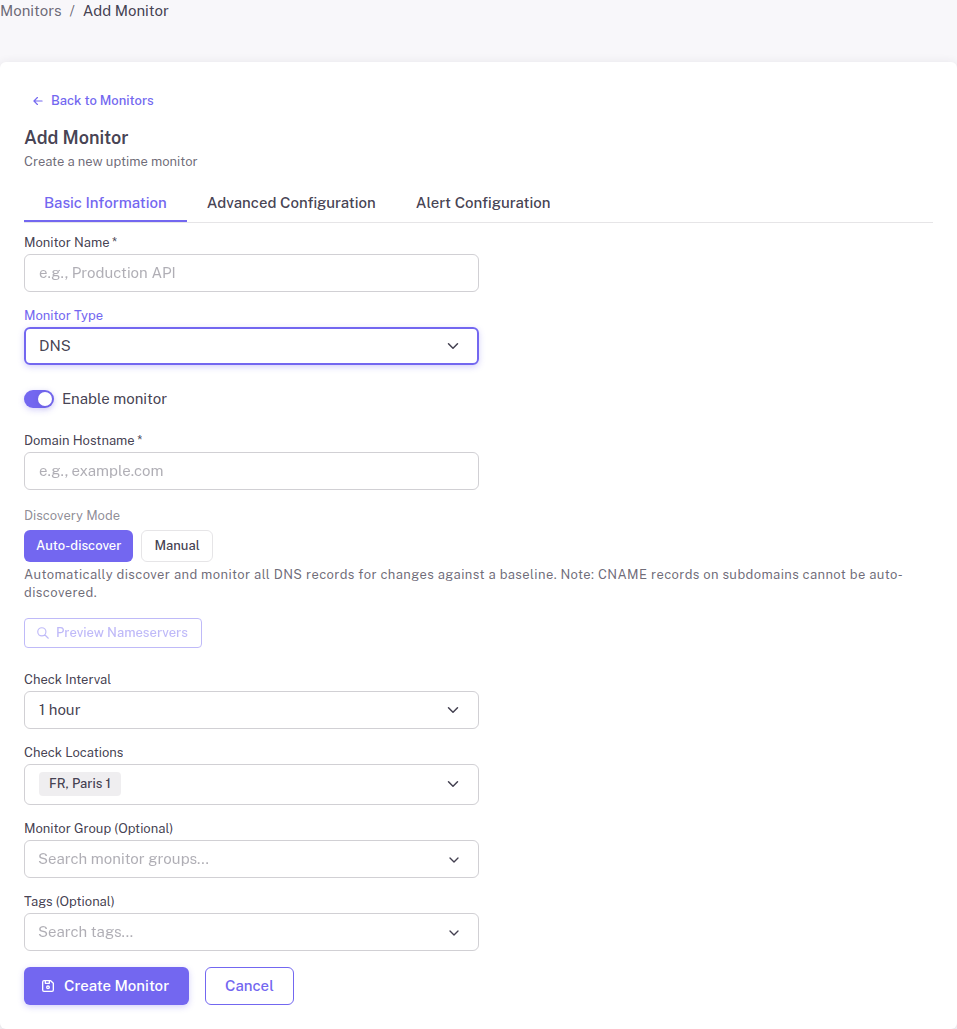
Configuration Options
Friendly Name – A descriptive name to identify this monitor in your dashboard and alerts.
Domain – The domain name you want to monitor (e.g., example.com or subdomain.example.com).
DNS Mode – Choose how StatusDrift should discover and monitor your DNS records:
- Auto-discover – StatusDrift automatically detects all DNS records for your domain and monitors them for changes. This is the recommended option for comprehensive monitoring.
- Manual – Specify individual record types to monitor. Use this when you only need to track specific records.
Manual Mode Record Types
When using Manual mode, you can select specific record types to monitor:
- A – IPv4 address records
- AAAA – IPv6 address records
- CNAME – Canonical name (alias) records
- MX – Mail exchange records
- TXT – Text records (including SPF, DKIM, DMARC)
- NS – Nameserver records
- SOA – Start of authority records
Check Interval
Set how frequently StatusDrift should query your DNS records. More frequent checks provide faster detection of issues but consume more of your monitoring quota.
Check Locations
Select the geographic regions from which DNS queries should be performed. Using multiple locations helps identify regional DNS issues or propagation delays.
How DNS Monitoring Works
Once configured, StatusDrift performs the following:
- Queries your domain’s DNS records from the selected check locations
- Stores the initial DNS record values as a baseline
- Compares subsequent queries against the baseline
- Alerts you when records change, disappear, or fail to resolve
Common Use Cases
Website Migration
When migrating to a new hosting provider, DNS monitoring helps verify that your A records update correctly and propagate across all regions.
Email Security
Monitor TXT records to ensure your SPF, DKIM, and DMARC configurations remain intact, protecting against email spoofing.
Multi-Region Deployments
For applications using GeoDNS or regional load balancing, monitor that each region returns the correct DNS responses.