
Domain Monitoring
Domain Expiration & Registrar Monitoring
The cheapest outage to prevent is the one where finance missed the renewal invoice. Track domain expiry dates, registrar changes, and nameserver moves — and get paged with weeks to spare, not when the domain is already in redemption.
Free forever tier. No credit card.
Every Business Has One Domain They Really Can’t Afford to Lose
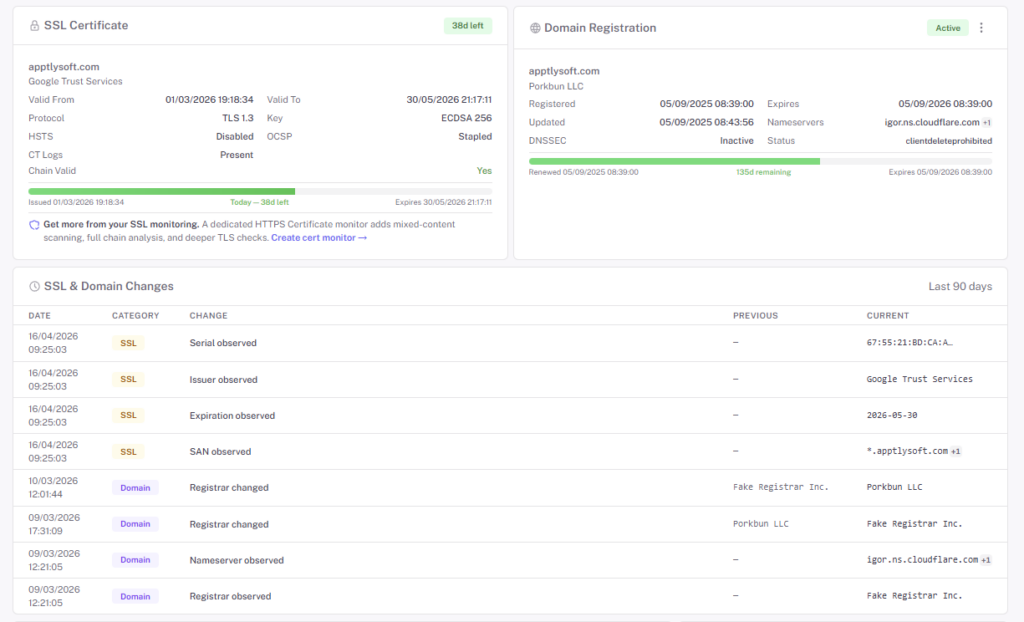
Domain expirations are one of the few outages that start before they start. The domain lapses into a grace period, then redemption, then auction — and by the time customers notice the site is gone, the recovery window has already cost you. StatusDrift watches the WHOIS record on every domain you care about and pages you long before that happens.
- Expiration alerts at escalating thresholds — early warning weeks out, escalating as the date approaches
- WHOIS change detection — registrar, registrant, nameserver, and organization fields tracked on every check
- Nameserver swap alerts — the first sign of an unauthorized transfer, or a legitimate one nobody told ops about
- Status flag tracking —
clientTransferProhibited,clientHold, and other registrar-set statuses, so a lock being removed doesn’t go unnoticed - Multi-TLD coverage — com, net, org, io, dev, co.uk, and most country-code TLDs worth registering
What Domain Expiry Actually Looks Like
The timeline from “paid up” to “someone else owns your brand” is shorter than most ops teams realize.
Day 0: expiration date passed
Most registrars stop renewing automatically if the card on file failed. Site may still resolve — the nameserver record is cached — but the clock is ticking.
Day ~30: nameservers stopped
Registrar parks the domain. All DNS resolution starts failing. Every subdomain goes dark at once — and that’s what support tickets look like from the outside.
Day ~45–75: redemption & auction
Redemption-period fees are hundreds of dollars. After that, the domain enters auction — and if anyone else wanted it, they’ll outbid you. The cheap fix becomes an expensive one very quickly.
Not Just the Expiry — the Whole WHOIS Record
Most “domain monitors” watch one field: the expiration date. Real ops risk lives in the rest of the record. A silently-changed registrant, a nameserver swap you didn’t do, a transfer-lock that got removed — these are the fingerprints of either a rogue admin, a social-engineering attack, or a team member who did something they forgot to tell you about.
- Registrar — which company is responsible for the domain
- Registrant organization & email — who’s the legal owner
- Nameservers — where DNS is served from
- Status flags — transfer locks, holds, and other registrar-side protections
- Creation date & last-modified — quick sanity checks after any change
When any of these changes between two checks, StatusDrift surfaces the before/after so an audit of “what changed when” doesn’t require digging through the registrar’s event log.
Common alert triggers
- Expiration date less than 60 / 30 / 14 / 7 days out
- Nameserver list changed
- Registrar changed (often indicates a transfer in progress)
- Registrant organization or contact email changed
- A transfer-lock flag was removed
- WHOIS record suddenly fails to resolve (registrar outage, or worse)
Questions Teams Usually Ask
My registrar already emails me. Why do I need this?
Registrar emails go to one inbox (often an alumni address nobody checks) and land in spam more often than you’d like. StatusDrift routes the alert to Slack, PagerDuty, your mobile app, or wherever your ops team actually lives — and if nobody acknowledges, an escalation policy keeps pressing.
What TLDs are supported?
Every major gTLD (.com, .net, .org, .io, .dev, .app, .co, etc.) and most ccTLDs. A few country-code registries have unusual WHOIS policies that can limit detail — if your TLD has a quirk, the monitor surfaces what it can and flags the rest.
How often is WHOIS re-queried?
Domain data changes slowly — hours to days, not seconds. WHOIS queries run at an interval that respects registry rate limits and still surfaces changes well within the window where you can act on them.
Do I need one monitor per subdomain?
No — WHOIS lives at the registered-domain level (example.com), not per subdomain. Monitor the apex once and you’re covered for every subdomain that depends on it.
What about brand-protection TLDs we bought but don’t use?
Those are exactly the domains most likely to lapse — they’re parked, nobody’s watching them. Add them as monitors anyway. A brand-protection domain reclaimed by a typosquatter is a PR problem waiting to happen.
Can I manage domain monitors in Terraform?
Yes — the StatusDrift Terraform provider covers domain monitors alongside every other type. Define the domain and alert contacts in the same repo as your DNS config.
Pairs Well With
SSL Monitoring
The two lapsed-payment outages ops teams hate the most live right next to each other. Monitor domain and cert as a pair.
DNS Monitoring
Watch A, AAAA, CNAME, MX, and TXT records for changes between checks — often the first sign a domain change is about to propagate.
Website Monitoring
The end-state check — if the domain and nameservers are fine but the site is down, it’s an app-layer problem.
Don't Lose the Domain You Built a Business On
Early-warning alerts, WHOIS change detection, and multi-TLD coverage. Free forever tier.