
PING monitors verify that a host is reachable by sending ICMP echo requests. This is the most basic form of uptime monitoring, useful for checking whether servers, network devices, and infrastructure components are online and responding.
When to Use PING Monitoring
PING monitoring is ideal when you need to:
- Verify that a server or device is reachable on the network
- Monitor infrastructure components that do not expose HTTP endpoints
- Track network latency and packet loss over time
- Get basic uptime monitoring with minimal overhead
- Monitor routers, switches, firewalls, or other network equipment
Creating a PING Monitor
To create a PING monitor, navigate to Add Monitor in your StatusDrift dashboard and select PING from the monitor type dropdown.
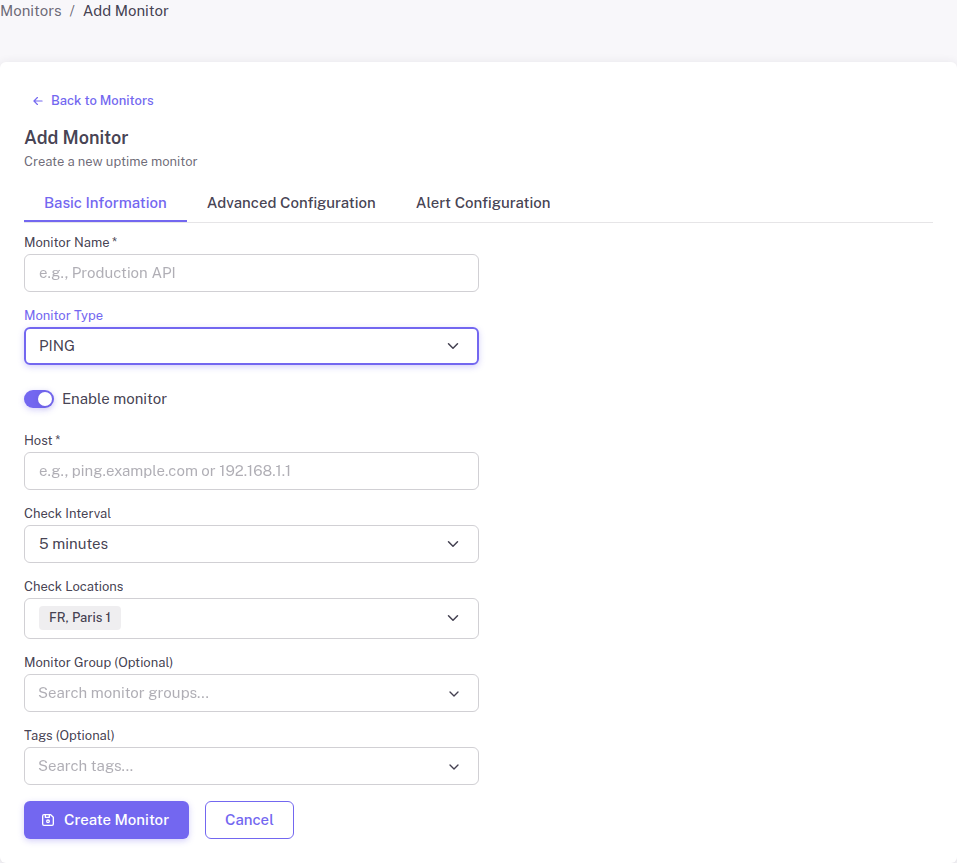
Configuration Options
Friendly Name – A descriptive name to identify this monitor in your dashboard and alerts.
Host – The hostname or IP address to ping. You can enter:
- A domain name (e.g., example.com)
- An IPv4 address (e.g., 192.168.1.1)
- An IPv6 address (e.g., 2001:db8::1)
Check Interval
Set how frequently StatusDrift should ping the host. Shorter intervals provide faster detection of outages but use more of your monitoring quota. Common intervals:
- 1 minute – For critical infrastructure requiring immediate alerts
- 5 minutes – Good balance for most production systems
- 15 minutes – Suitable for non-critical systems or development environments
Check Locations
Select the geographic regions from which PING requests should be sent. Using multiple locations helps:
- Distinguish between local network issues and actual outages
- Identify regional connectivity problems
- Reduce false positives from temporary network hiccups
How PING Monitoring Works
StatusDrift’s PING monitoring operates as follows:
- Sends ICMP echo request packets to the specified host
- Waits for ICMP echo reply packets
- Measures round-trip time (latency)
- Records success or failure for each check
- Alerts you when the host becomes unreachable or latency exceeds thresholds
PING vs HTTP Monitoring
Understanding when to use PING versus HTTP monitoring:
| PING Monitoring | HTTP Monitoring |
|---|---|
| Checks network reachability | Checks application availability |
| Works with any networked device | Requires HTTP/HTTPS service |
| Lower overhead | Can verify content and responses |
| Cannot detect application crashes | Detects when web server fails |
For web applications, HTTP monitoring is generally preferred because a server can respond to PING while the web application is down. Use PING monitoring for infrastructure that does not serve HTTP traffic.
Troubleshooting
Host Not Responding
If your PING monitor shows the host as down but you believe it is online:
- Verify that ICMP traffic is not blocked by a firewall
- Check if the server has ICMP responses disabled
- Confirm the hostname resolves to the correct IP address
- Test from multiple check locations to rule out network issues
Intermittent Failures
Occasional PING failures can indicate:
- Network congestion or routing issues
- Rate limiting on ICMP traffic
- High server load affecting response times